
this breif tutorial walks the average user through installing a RPM Package on a CentOS Install. An RPM file is a packaged piece of software: the program files plus metadata such as the version, the files it installs, and the other packages it depends on. The example below installs Webmin from an RPM, and the same steps apply to any .rpm file on CentOS, RHEL, AlmaLinux, Rocky Linux or Oracle Linux.
Prerequisites
- Root access (log in as root, or prefix the commands with sudo).
- The RPM built for your release and architecture:
el6,el7,el9and so on, andx86_64,aarch64ornoarch(noarch packages run on any architecture). - Download from the vendor or a trusted repository, since an RPM runs install scripts as root.
1. Download the RPM and find the exact file name
the first thing you want to do is login, and download your RPM (if you have not yet already). from there do a “LS” to see the exact file name.
ls
as you can see in this example it’s webmin-1.580-1.noarch.rpm
Before installing, you can look inside the package. -qpi shows its description and version, and -qpl lists the files it will install:
rpm -qpi webmin-1.580-1.noarch.rpm
rpm -qpl webmin-1.580-1.noarch.rpm
2. Install the package with rpm
to install type:
rpm -i webmin-1.580-1.noarch.rpm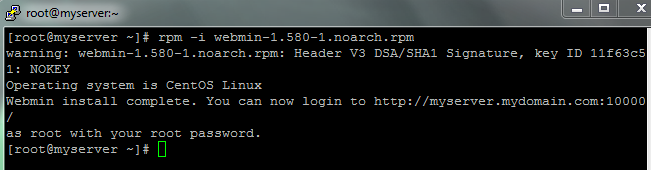
after a little bit of clockwork, it looks like the package installed! Many admins use rpm -Uvh instead: -U installs the package or upgrades an older version, -v is verbose and -h prints a progress bar.
About the NOKEY warning
The screenshot shows warning: ... Header V3 DSA/SHA1 Signature, key ID 11f63c51: NOKEY. The package is signed, but the signer’s public GPG key has not been imported, so rpm cannot check the signature. The install still goes ahead. To remove the warning, import the vendor’s key with rpm --import and the key file or URL the vendor publishes, then check the package with rpm -K webmin-1.580-1.noarch.rpm.
3. Verify the install
rpm -qa | grep webmin
rpm -qi webmin
The first command confirms the package is in the RPM database and the second shows its version and install date. For Webmin you can also browse to port 10000 on the server, as the install output says.
Let yum or dnf handle dependencies
Plain rpm does not download missing dependencies. It stops with a Failed dependencies error instead. Installing the local file with the package manager pulls dependencies from your enabled repositories:
yum localinstall webmin-1.580-1.noarch.rpm      # CentOS 6/7
dnf install ./webmin-1.580-1.noarch.rpm         # RHEL, AlmaLinux, Rocky 8-10
The ./ tells dnf it is a local file rather than a package name to search for.
Common errors
- Failed dependencies: use yum or dnf as shown above, or install the listed packages first.
- package … is already installed: use
rpm -Uvhto upgrade, or check the installed version withrpm -q. - conflicts with file from package: another package owns the same file. Find it with
rpm -qf /path/to/filebefore deciding what to remove. - Removing the package later:
rpm -e webmin, ordnf remove webmin. If an update breaks something, see Downgrade package CentOS 6.
That’s it! Thanks for visiting my blog, to get a professionally hosted Linux Server visit www.zwiegnet.com/go
Related guides: Downgrade package CentOS 6 | Build RPM From Source
2 Comments