
Install MariaDB on CentOS Linux
Install MariaDB on CentOS Linux
MariaDB is the new challenger to MySQL and is at least worth checking out. Let’s get started! Login to your server, and su to root

what we need to do is create a repo file, MariaDB is not yet available from Yum
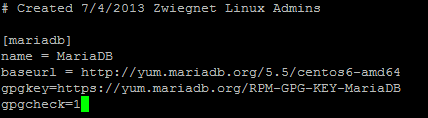
from here configure and add the following:
Save/Quit
do a Yum update to ensure the repo works

as you can see, it works, and wants to install MariaDB + Dependencies

from here, install MariaDB + Client

notice that there is some good info, to change the root password
set the service to run on startup, and now start the service

and as mentioned before, let’s set the root MariaDB password

–please note that it would not be intelligent to use the above listed password ‘SuperSecretPassword’
Done!

that was simple, let’s test it to make sure it works:
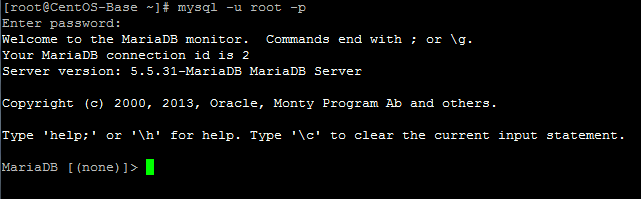
Perfect, we are in!
That’s it!
To get a hosted MariaDB server visit www.zwiegnet.com/go to get started today!
Related guides: Install PostgreSQL on RHEL/CentOS/Oracle/Rocky/Alma | Performing a MySQL Upgrade