
To find the mailbox size of an individual user for Zimbra, you have to be logged into Zimbra as the Zimbra user
su - zimbra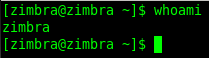
The Zimbra command-line tools live in /opt/zimbra/bin and are meant to be run as the zimbra user, which also has the right environment and admin credentials set up. whoami should return zimbra before you continue.
The zmmailbox command
all commands in relation to mailbox are handled by the zmmailbox command,
Let’s start at the beginning, the only way to learn a system in-and-out is to study the help
zmmailbox -h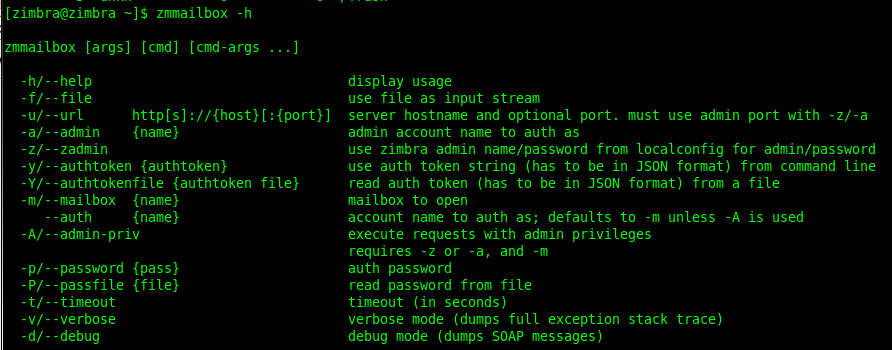
The options used below are -z (authenticate as the Zimbra admin using the credentials stored in localconfig, so no password is needed) and -m (the mailbox to open).
Get the size of one mailbox
let’s move on to an example!
zmmailbox -z -m user@mydomain.com gms
here’s an example on how to get info on the mailbox for user@mydomain.com, the z means use zimbra admin, and the m specifies a mailbox

as you can see, it outputs the value of the mailbox size.
gms is short for getMailboxSize. The value includes every folder, including Sent, Trash and Briefcase, so it is the number that counts against the user’s quota.
Message counts per folder
if you want to see the amount of emails in individual folders, issue the following:
zmmailbox -z -m user@mydomain.com gaf
it outputs as follows:
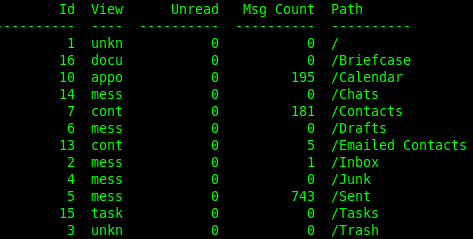
gaf (getAllFolders) lists each folder with its Id, view type, unread count, message count and path. It is the quickest way to find the folder that holds most of the mail, which is usually Sent, Inbox or Trash.
All accounts at once
To list usage for every account on a mailbox server, use zmprov instead:
zmprov getQuotaUsage mail.mydomain.comReplace the name with your mailbox server’s hostname (zmhostname prints it). The output has one line per account: the account name, its quota and the space used, both in bytes. Sorting it, for example with sort -k3 -n -r, shows the largest mailboxes first.
Troubleshooting
- command not found: you are not the zimbra user, or used
su zimbrawithout the dash so the PATH was not loaded. - account.NO_SUCH_ACCOUNT: the address is misspelled or the account does not exist on this server; check it with
zmprov ga user@mydomain.com. - Size looks too large: empty the user’s Trash and Junk folders, which still count toward the total.
The same commands work on current Zimbra releases, which run on RHEL 8/9-family systems and Ubuntu LTS rather than CentOS 6. For related admin tasks see Restart Zimbra Community Services and Migrate Zimbra Community to New Server.
That’s it! Hosted Linux Servers at www.zwiegnet.com/go
Related guides: Find out what version of Zimbra you are running | Get member of Zimbra Distribution group command line