
Setup Apache for Perl and CGI
Setup Apache for Perl and CGI
If you have some older Perl apps that you want to keep going instead of re-write them, here’s the basic process of setting up apache, testing the perl scripts, and then executing them via CGI.
login, and su to root

edit the apache configuration for the Instance in question

from here add the following to the bottom on the config file:
<Directory “/var/www/html/websitename/cgi/”>
Options +ExecCGI
AddHandler cgi-script .cgi .pl
</Directory>
make sure to restart the apache instance after making this change.
you must also create the “cgi” folder in that directory.
vi helloworld.pl

add the following code:
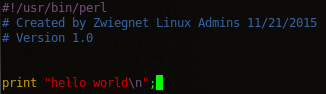
from here need to test first if the perl script works normally

Great, it works, now we need to make it work with CGI

so… the print “content-type” that makes it web executable, note that this must be placed BEFORE any other commands
We also need to make the file executable:
now if we go to our website, and point it to the cgi bin:
http://sitename/cgi/helloworld.pl
we should now see:
That’s it!
Hosted Linux Servers at www.zwiegnet.com/go
Related guides: Install Apache on CentOS 6.4 | Disable Apache Version
1 Comment