
Configure Certificate Authority(CA) CentOS 6
Configure Certificate Authority(CA) CentOS 6
Here’s the basic steps needed to configure an Internal Certificate Authority (CA) on CentOS 6
Login, and su to root

from here change to the CA directory

create an index for the CA
now set the certificate sequence number

create the CACERT+Key

enter a passphrase
fill out the following fields as necessary
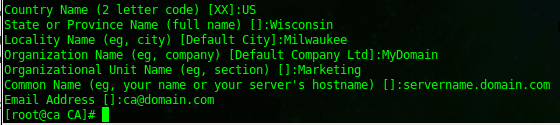
set restricted permissions on the key

At this point we can sign Certificate Requests, here’s the basic process:
cd to the CA directory again

copy your certificate request to the CA folder

now all we need to do is sign the cert

the final steps are to sign/commit the certificate. you now have your .pem and .crt
That’s it!
Related guides: Configure LDAP over TLS on CentOS 6: Self-Signed Certificate and LDAPS Server Setup | OpenLDAP over TLS: Client Setup, StartTLS Testing and Troubleshooting