
Resizing a Physical Volume CentOS 6
Resizing a Physical Volume CentOS 6
In this case I had a 5GB secondary hard drive that i want to expand to 10GB.
I expanded the Hard drive in XenServer from 5GB to 10GB, not we just need to make the OS recognize it.
/dev/xvdb1 = LVM mounted partition
/dev/xvdb2 = New Space
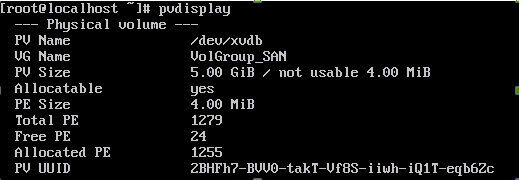
Here’s a display of our present PV’s
fdisk /dev/xvdb

make partition 2, and then write changes
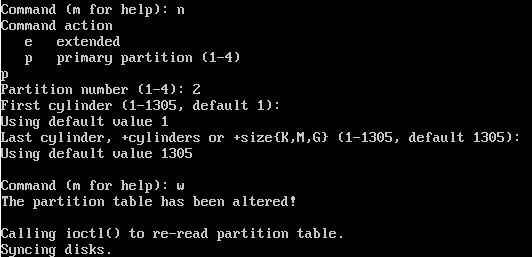
now create a new PV with the new space

now as we can see, the PV has been expanded from 5GB to 10GB
now we need to verify that the actual PV has been extended, issue the following command:
pvdisplay
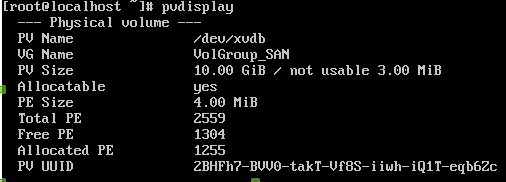
as you can see our physical volume /dev/xvdb is now 10.00 GiB instead of 5
That’s it!
Hosted Linux Servers at www.zwiegnet.com/go
Related guides: Add a Disk to LVM and Expand Space | Expand a Filesystem on CentOS Linux