
Remove an OU from OpenLDAP command line
Remove an OU from OpenLDAP command line
In this example we have added the OU SkyNet, however since then, SkyNet has become self-aware and we need to remove it from the LDAP database before the real problems start. Let’s login, and su to root

from here change to the temp directory to manipulate the LDAP database

dump the LDAP database to file

vi the dump

locate SkyNet
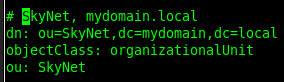
from here do a ctrl+c and then a :set nu

this should show us the line numbers
from here we want to write line 127 to a file named “SkyNet-Terminated”
vi the File

here’s the syntax to delete the OU

run this command to process the change

deleted!

however, Given that it’s SkyNet, we had better make sure that it’s Actually gone from the database. Do another Dump
from here vi the dump
from here we can search for SkyNet

cool, SkyNet has been exterminated!
That’s it!
Hosted Linux Servers at www.zwiegnet.com/go
Related guides: Add an OU to OpenLDAP command line | Remove user from openLDAP command line