
Add an OU to OpenLDAP command line
Add an OU to OpenLDAP command line
This blog goes through the basic process of adding an OU to your LDAP environment via Command Line. Let’s get Started, login, and su to root

from here change to the /tmp directory to allow easy manipulation of the LDAP database.

from here create a new file called “SkyNet” as that’s the name of the OU we are going to add
now vi the file

here’s the basic syntax for the file
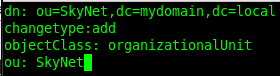
run the following command to create the new OU in the LDAP Database

cool, so apparently SkyNet has been added to the LDAP database

let’s double check to make sure by doing an LDAP dump

from here vi the ldapdb

look at that, we have become self-aware of SkyNet being in the LDAP database.
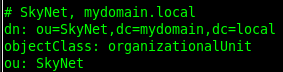
That’s it!
Hosted Linux Servers at www.zwiegnet.com/go
Related guides: Remove an OU from OpenLDAP command line | Add Group to LDAP command line