
modprobe FATAL Error inserting bonding
modprobe FATAL Error inserting bonding
modprobe: FATAL: Error inserting bonding (/lib/modules/2.6.18-194.17.1.el5/kernel/drivers/net/bonding/bonding.ko): Unknown symbol in module, or unknown parameter
I figured this would be a good one to share with everybody. We ended up doing this fix after routine maintenance, shutdown the server, powered it back on, and all of a sudden, the bond interface does not come back up! AAAHHHH! Have no fear, here’s the solution:
1) boot to single user mode by rebooting

hit a key at this screen
do a space and then the number one, and hit enter

now we have booted in single user mode

edit your modprobe.conf

this may also be here if an older config

the second line prob. looks like this:
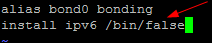
change it to this:

from here start your bond interface to make sure it works

fixed! now all we have to do is reboot and we are back in production (do not stay logged into single user mode, it’s not secure, and should only be used for maintenance.)
That’s it!
Hosted Linux servers at www.zwiegnet.com/go
Related guides: Redundant NIC Configuration (bond) CentOS | Configure Bond Interface Oracle Linux 6