
Mount CDROM Oracle Linux 6
Mount CDROM Oracle Linux 6
Mounting a CD/DVD can be a relatively easy process once we have a good idea about how to do it.
let’s login and su to root

from here we will do a search
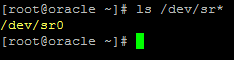 .
with the above command we are looking for devices that start with “sr” on an older version of Oracle, you may want to search for hdc0 or hd0. As we can see though, /dev/sr0 is our CD/DVD ROM Drive
The next step is to create a folder to mount the CDROM to, that’s what the /media folder is for
at this point we have a CDROM in our Oracle Linux server, we just need to attatch it to the os, or “mount” it
to do a temporary one-time mount, issue the following command:

in this instance, it’s a CD-ROM and it has mounted itself read-only (as expected)

if we do df -h we can see that our media is mounted
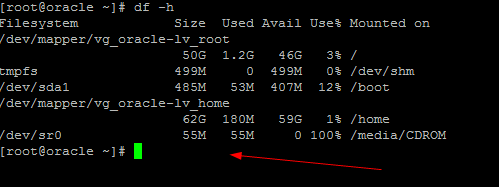
just like that our media is mounted, now we should be able to cd to /media/CDROM
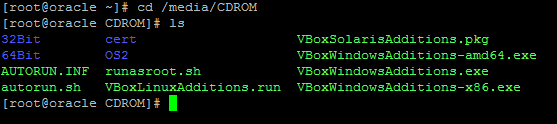
as you can see we have the VirtualBox installation components in the CD/DVD Drive
to un-mount issue the following command:

Now…. if we wanted to mount the CDROM EVERY TIME WE REBOOT that requires an additional step, and you need to run the previous step to unmount the CDROM before proceeding.
let’s edit the FSTAB config to make sure the CDROM permanently mounts

here’s the line we added to the bottom of our config
basically we made a comment to explan (because that’s what good Linux admins do) from there /dev/sr0 is mounted to /media/CDROM with the ios9660 filesystem type, and then ro means to mount it read-only
from there save + quit
from here we just need to mount the CDROM permanently
** WARNING THIS RE-MOUNTS ALL FILESYSTEMS, PLEASE WAIT TO DO IN OFF-PEAK HOURS!!! **
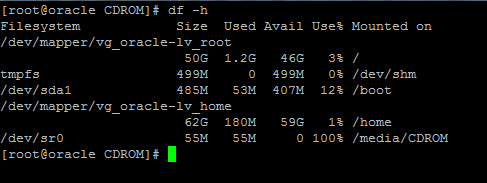
if there are no errors, double check the mount
as we can see, the CDROM has been mounted!
that’s it!
To get hosted Oracle Linux visit www.zwiegnet.com/go today!
Related guides: Mounting an ISO on CentOS Linux | Mount a Drive on CentOS Linux