
Redundant NIC Configuration (bond) CentOS
Redundant NIC Configuration (bond) CentOS
There are several situations where you would want to create what’s called a BOND in Linux to use two interfaces as one, such as redundancy, and load balancing.
let’s get started! for this example the Linux Box has 2 NICs, eth0, and eth1
login, and su to root

Let’s create the bond:
For an Active/passive scenario, use the following config:

High Availability:

- mode=0 (Balance Round Robin)
- mode=1 (Active backup)
- mode=2 (Balance XOR)
- mode=3 (Broadcast)
- mode=4 (802.3ad)
- mode=5 (Balance TLB)
- mode=6 (Balance ALB)
now create/edit the bond interface in the Interface directory

here’s a basic example of the config:
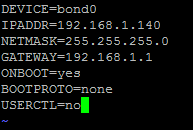
now we have to edit eth0 and eth1

here’s eth0 config
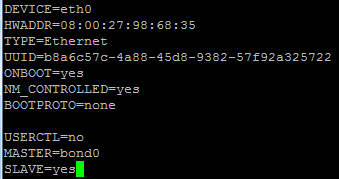
now on to eth1

here’s the config:
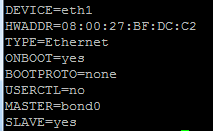
as you can see, the BOND in the master interface

let’s check the status of our bond:
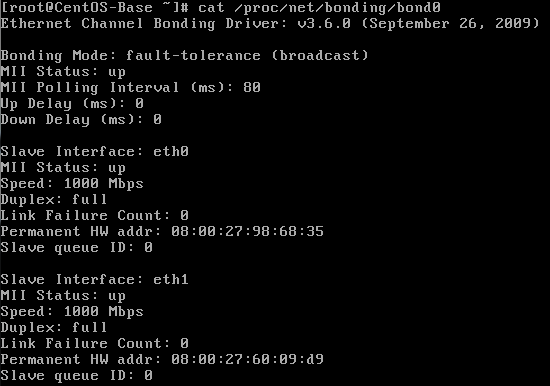
That’s it! You have successfully configured a BOND interface
to get a hosted Linux Server visit www.zwiegnet.com/go today!
Related guides: Find Hard Drive IOPS CentOS · Create Windows Share Oracle Linux · Configure SNMP on CentOS
1 Comment