
Configure Bond Interface Oracle Linux 6
Configure Bond Interface Oracle Linux 6

Multiple NIC bonding in Linux increases availability, and quality of network services. Linux combines multiple Network adapters into a single adapter called “bond” to achieve this increased availability and quality.
let’s get started, login and su to root

*** IF YOU HAVE NETWORK MANAGER INSTALLED, REMOVE IT, OR THE WHOLE PROCESS WILL NOT WORK ***
yum remove NetworkManager
the first thing we have to do is create the bond alias

that was easy

from here we need to create the interface config files

now edit the bond config

add the following to the config:
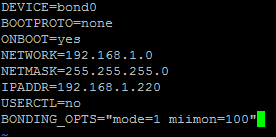
** Different bonding options can be set here, choose the one that best fits your situation*** Descriptions of each config here
now we need to edit the config for each NIC that will be part of the bond (keep the HWADDR the same for your config)

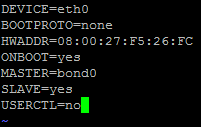
now onto 1

here’s eth1
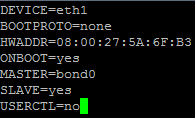
note that all interfaces get created as slaves, and the bond is the master
issue a “service network restart”
now login with the bond interface IP
to verify the bond status:
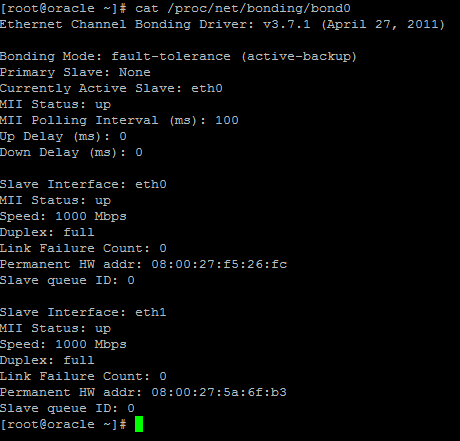
that’s it, the bond is configured correctly!
Hosted Oracle Linux at zwiegnet.com/go
Related guides: Redundant NIC Configuration (bond) CentOS
1 Comment