
Join Fedora to Windows Domain
Join Fedora to Windows Domain
from time to time you may be in a situation where we need to join to a Windows Domain, it’s not pretty, but it works well
login as root

now we need to install some per-requisites
done! now for the fun part!
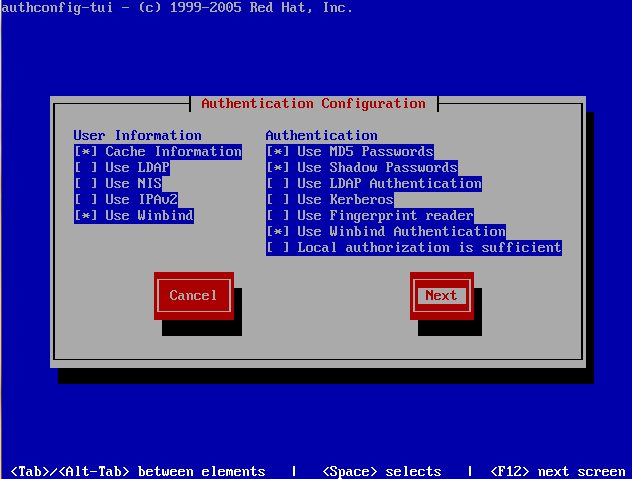
open authconfig-tui with the following command:
copy the configuration exactly
and part 2 (modify for your domain)
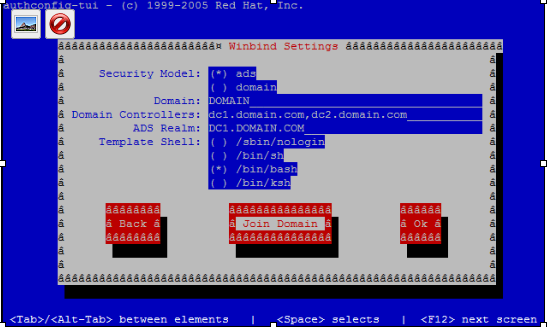
select join domain (save your config if it asks, unless you like typing alot)
Enter your Windows Domain administrator password (only works with administrator)
you should get a successful prompt, if not double-check your steps
go ahead and reboot (yep, that’s what happens when we involve windows)
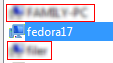
you should notice a new computer object in Active Directory users and Computers
you should now be able to login with your domain credentials (DOMAINuser)
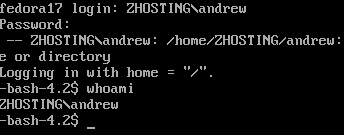
that’s it! you have successfully authenticated your Fedora box to Active Directory.
To get a Hosted Fedora Linux Server visit www.zwiegnet.com/go to get started today
Related guides: Join Linux Mint to Windows Domain | join computer to domain command line