
Join CentOS/RedHat to Active Directory Domain
Join CentOS/RedHat to Active Directory Domain
Sometimes you have to join Linux to an Active Directory Domain, If you run a Full UNIX/Linux environment, a better option would be 389 LDAP. There is a number of ways to join Linux to Active Directory, reasons you should, and reasons you shouldn’t (pm me azwieg103 on IRC).
A Special Thanks to RedHat For Providing this documentation, and discussing the options for the multiple ways to do this task.
Let’s get started!
login as root to your client machine
Pre-Requisite Tasks:
- configure ntp to use the Active Directory NTP Server
- configure DNS on the linux client to use the domain controller’s DNS, as well as “seachdomain and domain” need to be set to ‘testdomain.local”
- hostname of the linux system needs to match the domain, IE: adclient.testdomain.local
first, the big thing is to get kerberos to work properly.
vi /etc/krb5.conf
[logging]
default = FILE:/var/log/krb5libs.log
kdc = FILE:/var/log/krb5kdc.log
admin_server = FILE:/var/log/kadmind.log
[libdefaults]
default_realm = TESTDOMAIN.LOCAL
dns_lookup_realm = false
dns_lookup_kdc = false
ticket_lifetime = 24h
renew_lifetime = 7d
forwardable = true
[realms]
TESTDOMAIN.LOCAL = {
kdc = dc1.testdomain.local
admin_server = dc1.testdomain.local
}
[domain_realm]
.testdomain.local = TESTDOMAIN.LOCAL
testdomain.local = TESTDOMAIN.LOCAL
Verify the Kerberos configuration.
First, clear out any existing tickets:
[root@adclient ~]# kdestroy
[root@adclient ~]# klist
klist: No credentials cache found (ticket cache FILE:/tmp/krb5cc_0)
[root@adclient ~]#
Obtain a new Kerberos ticket:
root@adclient ~]# kinit administrator
Password for administrator@TESTDOMAIN.LOCAL:
Verify a new Kerberos ticket was granted:
[root@adclient ~]# klist
Ticket cache: FILE:/tmp/krb5cc_0
Default principal: administrator@TESTDOMAIN.LOCAL
Valid starting Expires Service principal
02/19/16 11:30:29 02/19/16 21:30:32 krbtgt/TESTDOMAIN.LOCAL@TESTDOMAIN.LOCAL
renew until 02/26/16 11:30:29
[root@adclient ~]#
now, we need to tell Kerberos to NOT use the administrator account:
[root@adclient ~]# kinit -k ADCLIENT$
[root@adclient ~]# klist
Ticket cache: FILE:/tmp/krb5cc_0
Default principal: ADCLIENT$@TESTDOMAIN.LOCAL
Valid starting Expires Service principal
02/19/16 11:33:11 02/19/16 21:33:12 krbtgt/TESTDOMAIN.LOCAL@TESTDOMAIN.LOCAL
renew until 02/26/16 11:33:11
[root@adclient ~]#
At this point Kerberos is fully functional and the client utilities (kinit, klist, kdestroy) can be
used for testing and verifying Kerberos functionality.
SSSD Method:
Install prerequisite packages:

vi /etc/samba/smb.conf
1. comment out security = user
the default settings are set to ‘security = user’ find/un-comment this line.
2. Configure for Windows Domain:
workgroup = TESTDOMAIN
server string = Samba Server Version %v
client signing = yes
client use spnego = yes
kerberos method = secrets and keytab
realm = testdomain.local
security = ads
max log size = 50
3. Start Samba Service
chkconfig smb on
service smb start
4. Join Windows Domain:
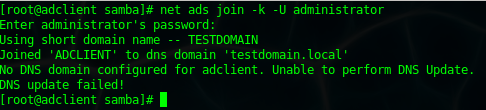
[root@adclient samba]# net ads join -k -U administrator
Enter administrator’s password:
Using short domain name — TESTDOMAIN
Joined ‘ADCLIENT’ to dns domain ‘testdomain.local’
No DNS domain configured for adclient. Unable to perform DNS Update.
DNS update failed!
[root@adclient samba]#
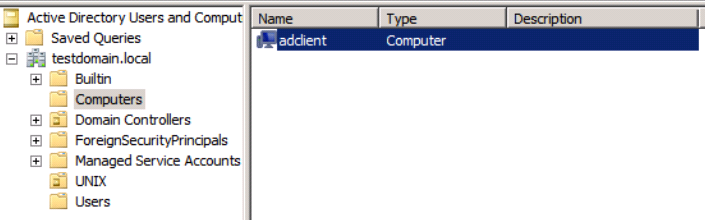
you should now see a computer object in Active Directory “computers”
[root@adclient samba]# authconfig –enablesssdauth –enablesssd –enablemkhomedir –update
Starting sssd: [ OK ]
Starting oddjobd: [ OK ]
[root@adclient samba]# chkconfig sssd on
[sssd]
config_file_version = 2
debug_level = 0
domains = testdomain.local
services = nss, pam
# Uncomment/adjust as needed if IMU is not used:
#override_homedir = /home/%d/%u
default_shell = /bin/bash
[domain/testdomain.local]
id_provider = ad
access_provider = ad
# Permits offline logins:
cache_credentials = true
# Use when service discovery not working:
# ad_server = dc1.testdomain.local
# Enables use of POSIX UIDs and GIDs:
ldap_id_mapping = false
Restart SSSD:

The Active Directory Server needs to have “Identity Managment for UNIX” Turned on
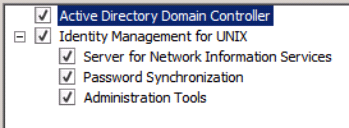
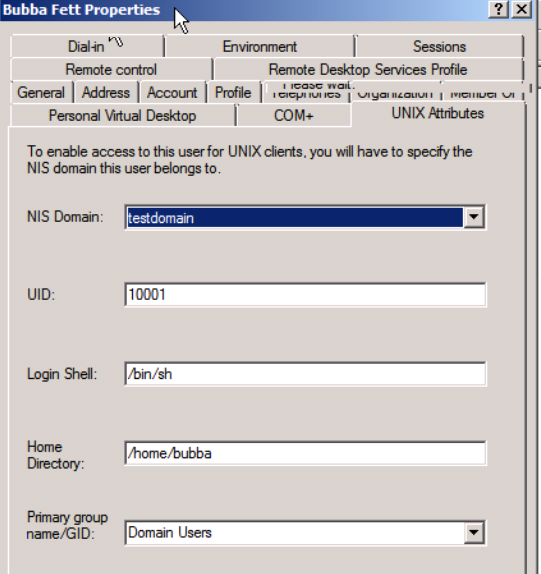
once enabled, you should be able to Sett UNIX Attributes on the AD Account:
in order for login to work, you need to provide a UID, shell, home directory, and primary GID
su – ‘domainuser’
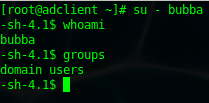
Done!
WINBIND METHOD:
** THE WINBIND METHOD IS AN OLDER, LESS USEFUL, LESS RELIABLE WAY TO DO IT, ONLY DO IT THIS WAY IF YOU DO NOT HAVE ANY OTHER OPTION….

once installed, the fun can begin, open authconfig-tui util

configure exactly as shown on the screen
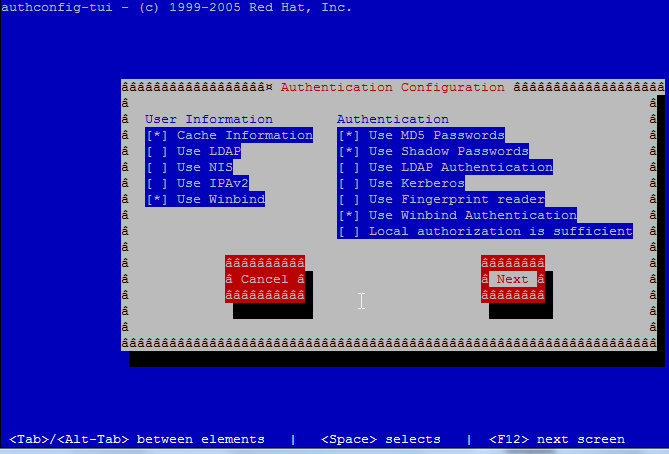
now part 2 (customize for your domain)
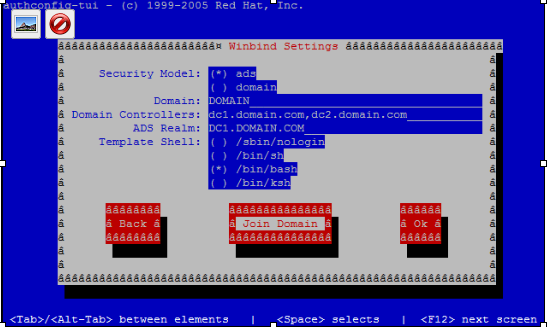
make sure it’s not set to /sbin/nologin otherwise domain users will not have shell access

save the config (unless you like typing)
now enter your windows domain administrator password (only works with administrator)
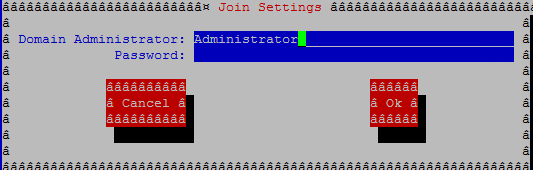
sweet! Joined the domain successfully
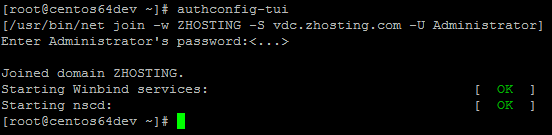
now from here reboot – of course with anything related to windows 
you should notice a object in Active Directory Users & Computers

to login as a domain user use the following DOMAIN/username
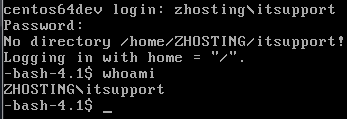
now we’re cook’n with gas!
from this point on Users/Groups are referenced user@DOMAIN, and groups are DomainAdmins@DOMAIN (if you are doing samba shares)

that’s it!
To get a hosted CentOS Server visit www.zwiegnet.com/go to get started today!