
Configure AutoMount CentOS 7
Configure AutoMount CentOS 7
If you use 389 or another type of LDAP, I would encourage you to use this article:
389-directory-serverldap-with-automount
Automount automatically mounts remote shares/directories to a specified folder. Let’s get started, login, and su to root

install the NFS utils, as this is what AutoMount most commonly is used for

now install autofs
from here edit the /etc/auto.master file

in this case we are going to mount our FTP NFS shares automatically, configure the automaster map pointer

from here now all we need to do is configure the auto.ftp map

from here configure, and customize as follows:

save+quit the file, now restart autofs, and set it to run on startup


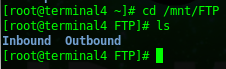
now if we browse to /mnt/FTP, we should see our 2 virtual folders, and inside of that will be our NFS mount
Additional Considerations:
if you run into issues with LDAP/User mapping, try switching to NFSV3 as the default

change lines 43/44 as follows:

That’s it!
Hosted Linux Servers at www.zwiegnet.com/go