
Install ClamAV on CentOS
Install ClamAV on CentOS
From time to time you need AV on Linux Servers, but if you have Samba Shares, a GUI, or share files, it’s a good idea
login as root

Download/Install the Repo
rpm -Uhv http://apt.sw.be/redhat/el5/en/x86_64/rpmforge/RPMS//rpmforge-release-0.3.6-1.el5.rf.x86_64.rpm
done!
now if we do a “yum search clam”
there’s a few things we may need, depending on the situation
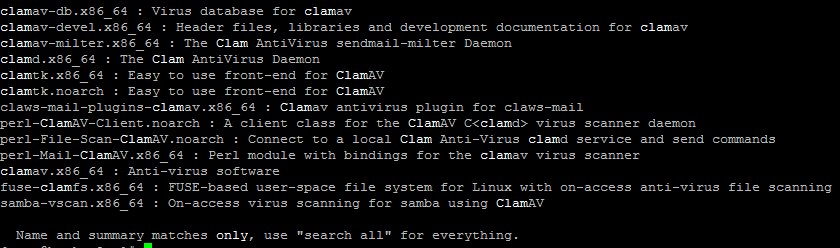
here’s what we’re going with, just the basic

great, installed! Now we need to do some housekeeping

set the service to start on reboot, and start it
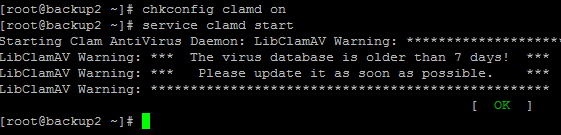
uh oh…. looks like our virus definitions are out of date, to bring them current do the following:
this may take a little bit, and there may be a bit on the screen

you should see some sort of progress indicator though

once all done:

success, HOWEVER there is a few things we need to do yet:
1) Update virus definitions on an hourly Basis
2) Run a Scan on a Weekly Basis

here’s a basic backup script for the AV Definitions update
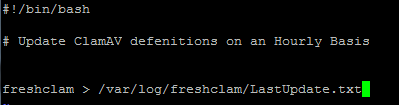
edit your cron jobs/crontab

add the following to fstab

as an example, here’s how we do a manual scan:
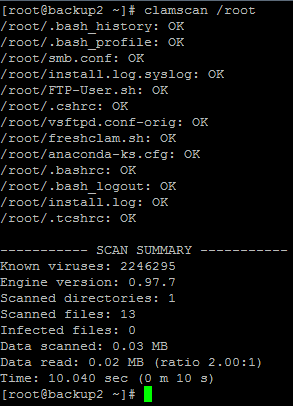
however, for a script, we need to modify it a bit

here’s a look at a basic script:
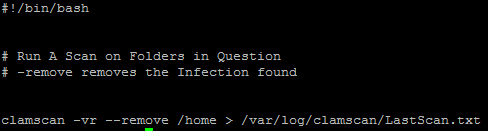
basically clamscan with Verbose Logging, Recursive into sub-directories, and –remove infections found in /home (or whatever directory you choose) and then output to a log
now ad to Cron as a scheduled job

That’s it!
to get a Hosted Linux Server visit www.zwiegnet.com/go to get started
Related guides: Configure Fail2Ban on CentOS | Configure Samba CentOS 6