
Export Active Directory to LDIF file
Export Active Directory to LDIF file
In this case we need to export our Legacy Active Directory system to a more modern OpenLDAP infastrucutre, so we need a copy of everything that’s in Active Directory to import into LDAP. Here’s the process
Login as Domain Administrator, or another account that has access to query the Active Directory Database
open a command prompt
run the following command to export the LDAP database from Active Directory:
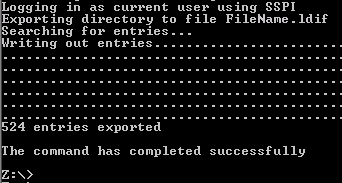
you should see the following:
Done, now we should have a full copy of the LDAP database in the Z: drive in this case, open it up to verify it looks correct
open with notepad
That’s it!
You have successfully exported Active Directory to LDIF format to import into LDAP.
Related guides: Active Directory 389 Directory Server Sync | Configure LDAP Server on CentOS 6