
So say you have a Server Core instance, and you need to enable remote PowerShell access so you can manage it from your workstation instead of the console. PowerShell remoting runs over WinRM (Windows Remote Management), and one cmdlet sets it all up.
Prerequisites
- Windows Server 2008 R2 or later. On Windows Server 2012 and later, remoting is already enabled by default, so this is mostly needed on older servers, on Windows client editions, or after someone has turned it off.
- An elevated PowerShell window on the server.
- Network access from your workstation to TCP port 5985 (HTTP) on the server, or 5986 if you set up an HTTPS listener.
1. Enable PowerShell remoting
Open a PowerShell window and use this command:
Enable-PSRemoting -ForceIf you copy it from elsewhere, make sure the dash before Force is a normal hyphen and not an en dash (–), or PowerShell won’t recognize the parameter.
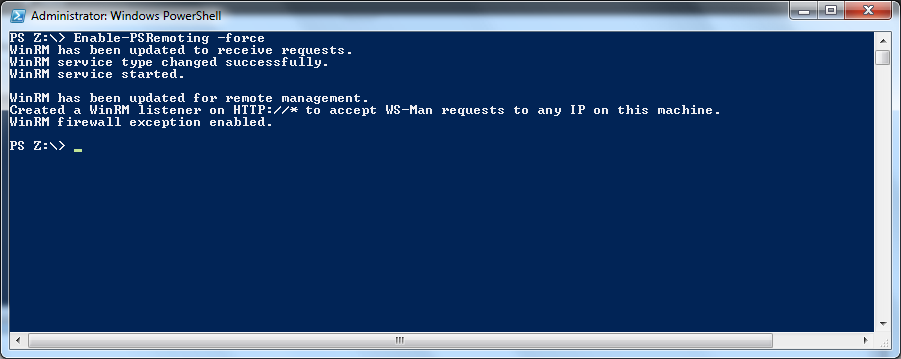
From here, as you can see, remote admin has been enabled and a rule has been added to the firewall.
What Enable-PSRemoting does
- Starts the WinRM service and sets it to start automatically.
- Creates a WinRM listener on HTTP port 5985 that accepts requests on any IP address.
- Enables the WinRM firewall exception.
- Registers the default PowerShell session configurations that remote sessions connect to.
-Force just skips the confirmation prompts. On older systems, winrm quickconfig does a similar job.
2. Test from your workstation
Test-WSMan SRV-CORE01
Enter-PSSession -ComputerName SRV-CORE01
Invoke-Command -ComputerName SRV-CORE01 -ScriptBlock { hostname }
Test-WSMan confirms the WinRM listener answers. Enter-PSSession gives you an interactive remote prompt (type Exit-PSSession to leave), and Invoke-Command runs a script block on one or many servers at once. On the server itself, list the listeners with:
winrm enumerate winrm/config/listenerWorkgroup servers and TrustedHosts
Inside a domain, remoting authenticates with Kerberos and just works. For a server outside the domain, or when you connect by IP address, the client must trust the target first. Run this on your workstation:
Set-Item WSMan:\localhost\Client\TrustedHosts -Value "10.0.0.25" -Concatenate
Enter-PSSession -ComputerName 10.0.0.25 -Credential (Get-Credential)
Troubleshooting
- Enable-PSRemoting fails because a network is Public: on client editions of Windows the firewall step refuses to run while any network is Public. Change the network to Private, or add
-SkipNetworkProfileCheck. - “WinRM cannot complete the operation” from the client: the server is unreachable or port 5985 is blocked. Check its firewall, as in Disable Windows Firewall Server Core, and any network firewall in between.
- TrustedHosts error (“The WinRM client cannot process the request … TrustedHosts”): you are connecting outside Kerberos. Add the target to TrustedHosts as shown above, or connect by the server’s domain name.
- Access is denied: your account must be a local administrator on the target (or a member of Remote Management Users).
Turning it off again
Disable-PSRemoting -Force only blocks remote access to the session configurations. It leaves the WinRM service, listener and firewall rule in place, so also stop and disable the service if you want remoting fully off:
Disable-PSRemoting -Force
Stop-Service WinRM
Set-Service WinRM -StartupType Disabled
Once remoting works you can, for example, reboot Windows Server Core remotely with Restart-Computer -ComputerName.
Related guides: Disable Windows Firewall Server Core | Install Server 2012 Core