
Configure NTP Server CentOS/Redhat/Oracle Linux
Configure NTP Server CentOS/Redhat/Oracle Linux
This process goes over configuring a NTP server, so that the server is dishing out time to clients. Let’s get started
login, and su to root

from here we need to install the ntp server

configure NTP to start after a reboot, and now as well

from here we need to edit the config file

add the following lines to the config:
we need to add our local networks (and remote if you have any) that are allowed to sync with the time server

you want to add a few extra other than the default to synchronize with, usually something local
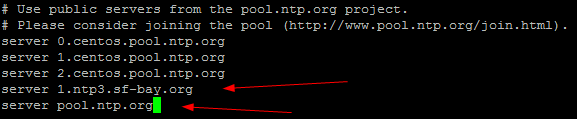
un-comment the following line, this allows the server to check against itself if it cannot reach all of the internet time servers

like so:

at this point we need to sync our time server with an accurate time source

at this point there is one final step….
WAIT 5 MINUTES FOR THE SERVER TO SYNC UP WITH INTERNET NTP SERVERS
IF YOU DO NOT WAIT, YOUR NTP SERVER WILL NOT APPEAR TO WORK…….
That’s it!
Hosted Linux Servers at www.zwiegnet.com/go
Related guides: Setting up NTP CentOS 6 | Moving Windows NTP Server
1 Comment