
Configure DHCP Reservation CentOS
This blog covers creating a DHCP reservation, or fixed-ip on dhcpd for CentOS Linux. At this point we assume you already have a running DHCP server on CentOS. If you do not, go ahead and click here to get one setup.
A reservation (ISC dhcpd calls it a host declaration with a fixed-address) ties one MAC address to one IP address. The device still uses DHCP, so it also gets your gateway, DNS servers and domain name from the server, but it always receives the same address. That is handy for printers, media players, NAS boxes and anything you port-forward to.
Prerequisites
- A working ISC dhcpd server on CentOS (see the link above).
- The MAC address of the device. On Linux run
ip link(orifconfig), on Windowsipconfig /all, or look in the existing lease file/var/lib/dhcpd/dhcpd.leases. - A free IP address. Pick one outside the dynamic
rangeof the subnet so the server never hands it to another client.
1) Edit the configuration
Let’s get started, login, and su to root on your DHCP server.
Let’s open the DHCP configuration file
On CentOS 6 that is /etc/dhcp/dhcpd.conf (CentOS 5 used /etc/dhcpd.conf):
vi /etc/dhcp/dhcpd.conf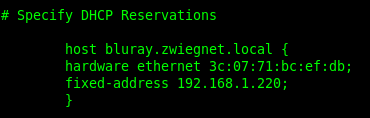
2) Add the host block
here is an example of a DHCP fixed-ip
# Specify DHCP Reservations
host bluray.zwiegnet.local {
        hardware ethernet 3c:07:71:bc:ef:db;
        fixed-address 192.168.1.220;
}
as you can see, you put in the hostname, the hardware ethernet (AKA the MAC address) and the fixed address that you want the MAC address to receive when it contacts the dhcp server.
The name after host is just a label and must be unique in the file. Every statement inside the braces ends with a semicolon; a missing one is the most common reason dhcpd refuses to start. Add one host block per device.
3) Check the syntax and restart
once you have added the changes for your configuration, go ahead and save + quit.
Test the file before restarting, so a typo does not take DHCP down for the whole network:
dhcpd -t -cf /etc/dhcp/dhcpd.conf
service dhcpd restart
that’s it, you fixed IP should be working now!
Verify
- On a Linux client, release and renew:
dhclient -r eth0; dhclient eth0, thenip addr show eth0. On Windows:ipconfig /releaseandipconfig /renew. - On the server, watch the log while the client renews:
tail -f /var/log/messages | grep dhcpd. You should see DHCPDISCOVER/DHCPOFFER/DHCPREQUEST/DHCPACK for the reserved address and the client’s MAC. - Do not expect the reservation in
dhcpd.leases. dhcpd does not record fixed-address assignments in the lease file.
Troubleshooting
- The client keeps its old address: it is still holding a valid lease. Release and renew, or reboot it.
- dhcpd will not start: run
dhcpd -tand fix the line it reports, usually a missing semicolon or brace. - Wrong device gets the address: check the MAC; Wi-Fi and wired interfaces have different MACs, and some phones use a random MAC per network.
- Address conflict warnings: the fixed address is inside the dynamic range or is configured statically on another machine.
RHEL, AlmaLinux and Rocky 9/10
RHEL 9 and its rebuilds still ship ISC dhcpd as the dhcp-server package; the host block above is identical, and you restart it with systemctl restart dhcpd. ISC DHCP is end-of-life and RHEL 10 drops it in favour of Kea. In Kea the reservation goes inside the subnet in /etc/kea/kea-dhcp4.conf:
"reservations": [
    { "hw-address": "3c:07:71:bc:ef:db", "ip-address": "192.168.1.220", "hostname": "bluray" }
]
Check it with kea-dhcp4 -t /etc/kea/kea-dhcp4.conf and apply it with systemctl restart kea-dhcp4.
Related guides
More on ISC dhcpd: Configure ISC DHCP logging and Configure DHCP for dynamic DNS on CentOS 6.
Hosted Linux Servers at www.zwiegnet.com/go