
Change home directory of LDAP user command line
Change home directory of LDAP user command line
In this scenario, we are moving the home directory of a user to another location in LDAP. We are assuming at this point that the physical files/folders are in the new location, and that all we have to do is modify the LDAP home directory so they can login properly.
In this example, we are modifying the user “John” his home directory is presently /home/users/john, but management wants him to be in /home/john. Here’s the process
login, and su to root

from here change to the /tmp directory where we can modify the ldap database

from here do a dump of the LDAP Database
now we need to vi the ldapdb

in this case, we are going to change “John’s” home directory, so locate the user John
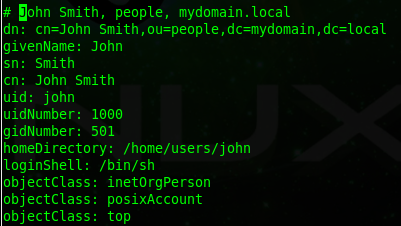
found him, ok, now we need to set the line numbers to show up, hit ctrl+c and then :set nu

now we can see the line numbers
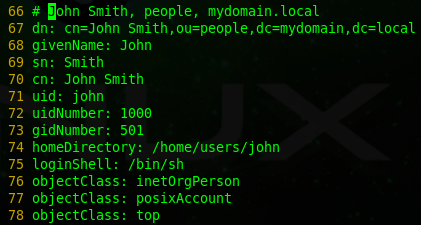
now we have to write line 67 for the user dn to file, hit ctrl +c and then type 67 w! John

this obviously writes line 67 to a file named John. Quit out, and vi John
setup the file as follows:
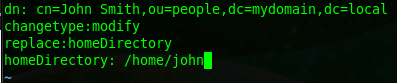
so as you can see we are changing John’s home directory from /home/users/john to /home/john
now we need to commit the change to the LDAP database, do so with the following command:

enter your LDAP admin password, and you should see the following:

no errors, so now we need to double-check all worked properly in ldap by doing another dump

from here vi the file

now as we can see on the final line, is that John’s home directory has changed!
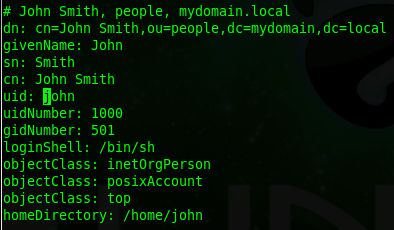
That’s it!
Hosted Linux Servers at www.zwiegnet.com/go
Related guides: Update LDAP account command line | Add User to LDAP command line