
Update LDAP account command line
Update LDAP account command line
In this example we are going to use the classic example of “Jane Doe” got married to “Joe Buck” so needs her account, and everything in the university updated from “Jane Doe” to “Jane Buck.” Thanks Jane….. Here’s the process:
login to your LDAP server, and su to root

cd /tmp where we can manipulate the LDAP database

from here we need to do a dump of the LDAP database
let’s edit ldapdb

from here we need to find Jane Doe’s account
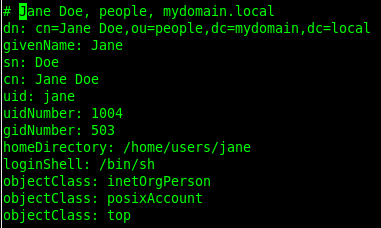
now let’s set the line numbers with a CTRL+C and then a :set nu

it should look like so:

we are going to now write lines 107 to a file with ctrl+c and then the following:
done, now let’s edit the file:

in this part of the example, we are changing 2 things, the SN, and the cn:
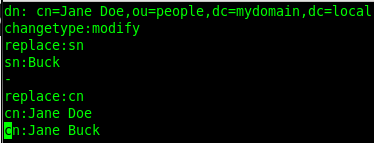
run the following to commit the change to the database:

now Jane Doe/Jane Buck are both aliases of this account. Let’s dump LDAP
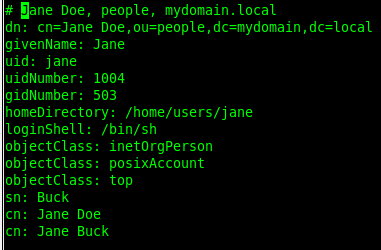
as you can see at the bottom, the SN (last name) is Buck, and the account will respond as both Jane Doe or Jane Buck.
That’s it!
Hosted Linux Servers at www.zwiegnet.com/go
Related guides: Add User to LDAP command line | Change home directory of LDAP user command line