
using at command Linux
using at command Linux
the at command is a very useful tool for one time, misc tasks. In this example we have a FTP server that needs an account disabled at midnight. We know that we can use CRON, however that will run the task every day. We just want it to run once and never do it again. At to the rescue!
login and su to root

from here we need to install at (it’s a good idea on fresh installs to install at, it’s extremely useful)

it’s important to understand that at runs as a deamon process in the background (much like cron)
now we can start using at.
so as mentioned before, we want to disable an account at midnight, so we are going to start using at for that

here’s how it works
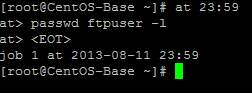
hit enter ater you insert your time, then provide an action (reboot is another fine example) and then once you are all set, hit CTRL + D that will give you the job number, and what time it will run at.
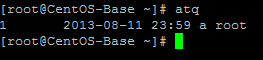
atq will show you your present at jobs that are scheduled
if you want to add a more complex job, such as running 7 days from now, do the following:

if you want to delete an at job, use at rm, and then job number

that’s it! You are a certified “at master”
to get a hosted Linux box visit www.zwiegnet.com/go to get started today
Related guides: Configure FTP Server CentOS 6 | Send Email Script CentOS
1 Comment