
Configure FTP Server CentOS 6
Configure FTP Server CentOS 6
configuring plain old ftp should be done generally for internal servers, however if you choose, this way can also be used to run public FTP. – Note that this blog assumes you have iptables/SELinux disabled, and that you are not joined to an Active Directory Domain
login as root

install vsftpd
Start the service, and make sure it starts on startup
make a backup of the original configuration

delete/overwrite the original config file and add the following lines:
# Created By Zwiegnet Pro IT Linux Admins
anonymous_enable=NO
chroot_local_user=YES
local_enable=YES
write_enable=YES
local_umask=022
dirmessage_enable=YES
xferlog_enable=YES
connect_from_port_20=YES
xferlog_std_format=YES
ftpd_banner=Welcome to Zwiegnet Backup FTP Server
listen=YES
pam_service_name=vsftpd
userlist_enable=YES
tcp_wrappers=YES
from there save/quit

restart vsftpd to load new settings
now we need to add a new FTP user
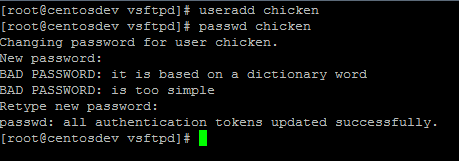
perfect, we added a user
now we need to change the user login shell (so they can only login ftp, no ssh)

now we will test with good o’l Filezilla
as you can see, the account works! (note that it’s on port 21) that’s what you would have to open on your firewall
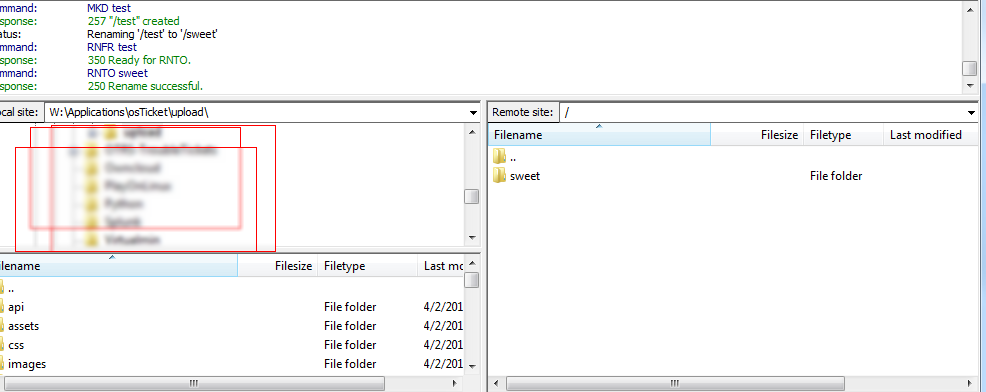
we just have one more step, we have to enable account lockout (otherwise you could run into what’s called DDoS)
http://blog.zwiegnet.com/linux-server/configure-account-lockout-policy-centos/
from here, you may want to install SAMBA to share your FTP accounts internally, but i’ll leave that up to you!
That’s it!
to get a hosted FTP server visit www.zwiegnet.com/go today!
Related guides: Using curl with vsftpd FTPS (FTP Over SSL) | Configure TFTP Server CentOS 6