
Send Email Script CentOS
Sending an email with CentOS cannot be easier here’s a script that seems to always work that i would like to share with the world.
basically it assumes that you have sendmail or postfix, or something of that nature installed on the physical server to send email out from itself.
login as any user and create a new script with the following command:
touch Email-Script
from there you have your email script, let’s go ahead and edit it by the next command:
vi Email-Script
hit the letter a to “append” to the document
Copy/Paste the following code into the script:
#!/bin/bash
#
#
# Server Reboot Script Written By Andrew Zwieg 2011
#For Use with CentOS/Redhat Linux 5 or Higher
#
#
#email send script
#
#
#
# subject of email
SUBJECT=”EMAIL SUBJECT”
# destination
EMAIL=”user@domain.com”
# Email body
EMAILMESSAGE=”/tmp/messagebody.txt”
echo “Linux Server Is Being Rebooted” > $EMAILMESSAGE
echo “CRON Scheduled Task” >> $EMAILMESSAGE
# send message using /bin/mail
/bin/mail -s “$SUBJECT” “$EMAIL” < $EMAILMESSAGE
edit the bold fields as necessary
from there to save/quit run the following:
ctrl +c
:wq
now we have to make our script executable, so use the following command to make it executable:
chmod +x Email-Script
from there do a LS, and you should see that your script is green
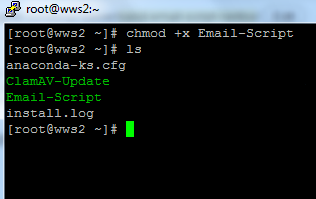
from there all we have to do is test it by starting the script, go like this:
./Email-Script
That’s IT! your email has been sent!
zwiegnet.com/go for Linux Consulting
Related guides: using at command Linux | Base CentOS Installer Script, adds user accounts, password, utilities, and updates