
Install OpenVAS on CentOS
Install OpenVAS on CentOS
OpenVAS or Open Vulnerability Assesment System is uses to assess system security for known vulnerabilities. This is a great alternative to Nessus, and some of the other commercial security scanners. Let’s get started:
Login, and su to root

Download, and install the atomic repo
if you agree to the terms, hit yes

now install openvas

this will take a while…. once completed, run openvas-setup

this takes a while, it download the latest database
once completed, enter the Administrator password
once completed, you are able to login

go to your web browser, default username is admin

enter you password you entered during setup, and you should be able to login.
To start a scan, enter an IP in the start scan area
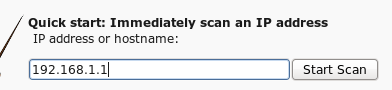
you should see in the top an immediate scan starting.
Once completed, you should be able to view your results, and make the necessary corrections.
That’s it!
Hosted Linux Servers at www.zwiegnet.com/go
Related guides: Install ClamAV on CentOS | Configure Fail2Ban on CentOS