
Using sed to configure SELinux
Using sed to configure SELinux
For a while we have been looking for a practical example as to an area you would want to use SED.
So, normally, we would go through the painful process of vi /etc/selinux/config, edit it to

and then change SELINUX=enforcing to disabled
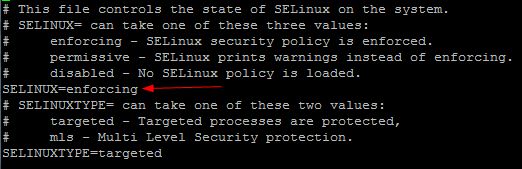
save, and then reboot. How fun right?
How about a one-liner that does that whole process?

check that out!
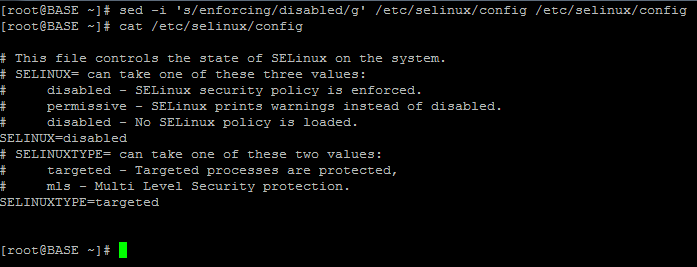
all that’s needed is a reboot
here’s’ the command broken down:

sed -i, the i= means ignore the if it’s upper or lower case
s/ means substitue
enforcing/disabed means you are substituting enforcing for disabled
the first /etc/selinux/config is the source, and second is the destination
sed -i ‘s/OriginalWord/ReplacmentWord/g’ /SourceDir/FileName /DestDir/FileName
that’s it!
To get a hosted Linux server visit www.zwiegnet.com/go today!