
Remove user from a group OpenLDAP command line
Remove user from a group OpenLDAP command line
If an end-user changes position, or gets transfered, you may need to remove them from an LDAP group. Here’s the basic process
Login, and su to root

change directory to /tmp to manipulate the LDAP database

from here we are going to take a dump of the LDAP database
vi the LDAP database
in this scenario, we want to remove our use John from the Finance Group, so we locate the Finance Group
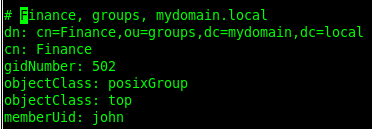
from here hit ctrl+c and type the following:

this shows the line numbers, now hit ctrl+c again and type the following:

this takes line 49, and writes it to a file called Finance, edit the file once done
from here we have to set-up the file to delete the user
once that’s all setup, we need to commit the change to the database

run the command, authenticate as the LDAP admin

Successfully modified/removed the user, now we just have to check, by re-dumping LDAP

perfect, John has been removed from the group!
That’s it!
Hosted Linux Servers at www.zwiegnet.com/go
Related guides: Add user to a group OpenLDAP command line | Remove user from openLDAP command line
1 Comment