
Mount NFS Share on CentOS 6
Mount NFS Share on CentOS 6
you have to install nfs-utils for this to work, so issue the following command:
yum install nfs-utils
from here we need to make a folder that will let us mount the Share, so use this command:
mkdir /mnt/NFS
start the portmap service, and set it to start on startup:
service portmap start
chkconfig portmap on
from here all we need to do is mount with the next command:
mount -t nfs ip-of-server:/NFS /mnt/NFS
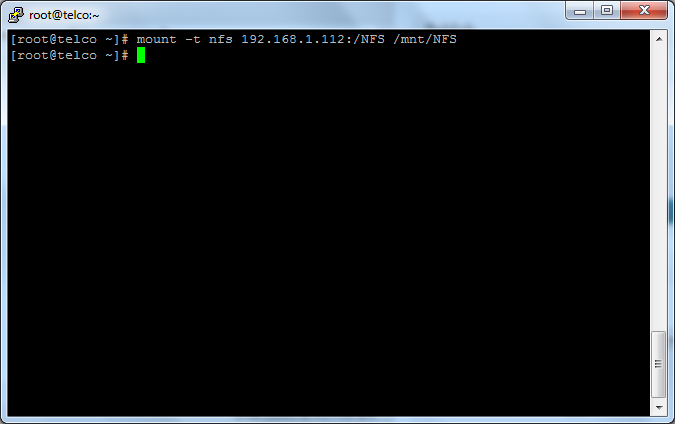
as you can see this successfully mounted, to verify type the following:
df -h
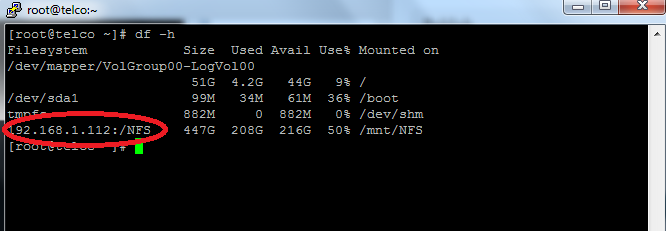
as you can see, the remove volume shows up as a local disk, you have successfully mounted NFS Share!
now all we need to do is add the command to startup:
vi /etc/fstab
it should look like so:
Save+quit
from here there is one final command to run, to mount all filesystems
** Note this will re-mount all filesystems, do in off-hours ****
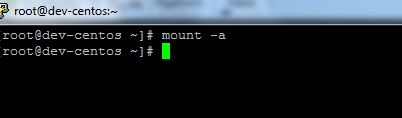
mount -a
Success! no errors!
to do a final check, do another df -h
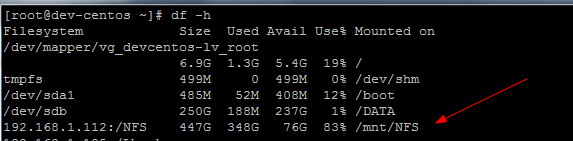
to unmount the NFS Share type the following command:
umount /mnt/NFS
*** the command is UMOUNT not un-mount *** i have made this mistake 1000’s of times.
That’s It! If you found this article helpful, zwiegnet.com/go for Linux Consulting
Related guides: Setup NFS Server on CentOS 6 | input/output error from NFS client on CentOS
2 Comments