
Load Balance Squid Reverse Proxy
Load Balance Squid Reverse Proxy
This blog assumes you have setup a reverse proxy for a single website, and want to load-balance multiple websites, using a squid reverse-proxy.
If you have not done so, click here
Let’s Login and SU to root

from here make a backup of the configuration file

now let’s go ahead and modify the configuration file
modify lines 62 as follows, make sure to customize and use the actual IP:
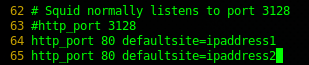
from here go to the bottom of the configuration file, and configure using the round-robin method
once customized, re-load the squid configuration

now browse to the IP address of the squid server, and access the website.
Now hit refresh, and BAM! It goes to the other web server!
That’s it!
Hosted Linux Servers at www.zwiegnet.com/go
Related guides: Configure Squid LDAP Authentication | Configure keepalived for ip failover CentOS 6