
There are several ways to see which databases live on a Microsoft SQL Server instance, depending on what tools you have. This guide covers the SSMS GUI, T-SQL, the sqlcmd command-line tool and PowerShell.
Method 1: SQL Server Management Studio
1. Open SQL Server Management Studio (SSMS) and connect to the instance.
2. In Object Explorer, expand the server node, then Databases.
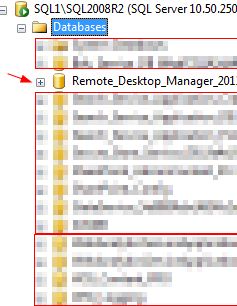
The user databases are listed there. System databases are in the System Databases folder. Press F5 on the Databases node if you just created or restored one and it doesn’t appear yet.
Method 2: Query sys.databases
This works from any query window and gives you more detail than the GUI:
SELECT name, database_id, state_desc, recovery_model_desc, create_date
FROM sys.databases
ORDER BY name;
IDs 1 through 4 are the system databases: master, tempdb, model and msdb. To list only user databases, run:
SELECT name FROM sys.databases WHERE database_id > 4;Method 3: sp_databases
The older stored procedure also returns each database’s size in KB:
EXEC sp_databases;Method 4: sqlcmd from the command line
This is handy over SSH, in scripts or on Server Core. It works with Windows authentication (-E):
sqlcmd -S SQL01 -E -Q "SET NOCOUNT ON; SELECT name FROM sys.databases"For a named instance, use -S SQL01\INSTANCE. For SQL authentication, use -U sa. The same command works with the mssql-tools package for SQL Server on Linux.
Method 5: PowerShell
With the SqlServer module installed (Install-Module SqlServer), run:
Get-SqlDatabase -ServerInstance SQL01 | Select Name, Status, RecoveryModel, SizePermissions note
Logins see only the databases they are allowed to. If someone can’t see a database in SSMS or sys.databases, they may need the VIEW ANY DATABASE permission. Members of sysadmin see everything.
That’s it! For other database tasks, see our MySQL and PostgreSQL guides in the database category.
To get a hosted SQL Server visit www.zwiegnet.com/go to get started today!
Related guides: Performing a MySQL Upgrade · Convert MySQL Slave to Master
1 Comment