
Enable/Disable CUPS Printer
Enable/Disable CUPS Printer:
CUPS can be cranky sometimes, if there is more than 500 jobs in a queue (defined in cups.conf) it will disable a printer, that way you know there is a problem.
do a lpstat -a to get a list of printers

Enable CUPS Printer:
now add the -p option, to check if the printer is enabled
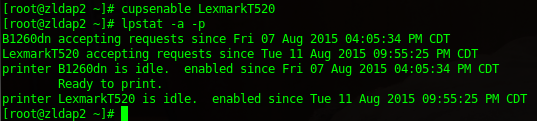
Ah Ha! LexmarkT520 is disabled, run cupsenable {printer-name}
yay, it’s working again.
Disable CUPS Printer:
Related guides: Share CUPS UNIX printer with Windows IPP | Configure CUPS Web Interface for SSL CentOS 6