
Drupal 7 OpenLDAP authentication
Drupal 7 OpenLDAP authentication
Web Server Prerequisites:
yum install php-ldap
service httpd restart
Install/Activate the Entity Module:
Download the LDAP Plugin from the Following:
Install/enable the module, and all sub-modules, browse to the module via
Configuration –> LDAP Configuration
Password Security:
Edit the settings to store passwords using Blowfish (the default is no encryption, not every secure)
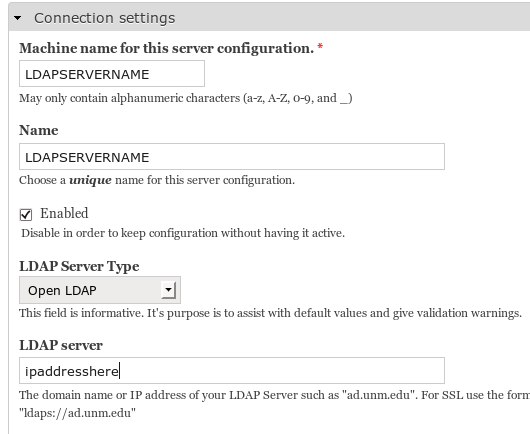
Create/Edit the first server settings as follows:
** IMPORTANT ** Initially configure with “service account bind for searches” using the LDAP admin account+passsword and save.
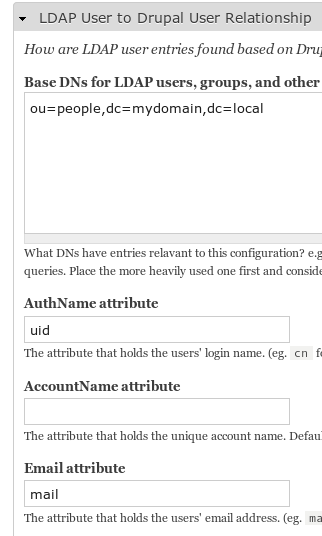
hit add, and now change it to use anonymous search.
Now configure the User-To-Drupal area, add the OU’s that users who are authenticating to the system use, as well as UID and mail for the LDAP attributes
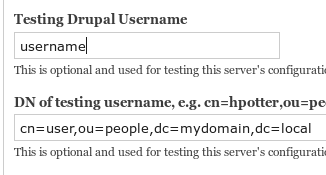
configure a username to test the LDAP database with
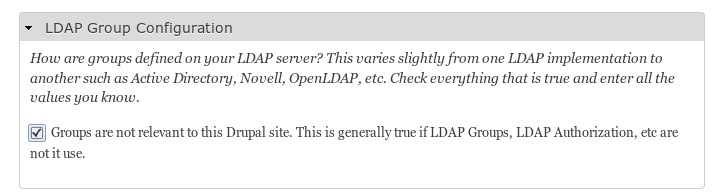
set the groups settings to be irrelevant for this drupal site
Test, and make sure all is working, if not retry the “service account bind” with a LDAP account, and then set to anonymous once working. You will know if it works, because you will get a list of all info about the test user account.
User Configuration:
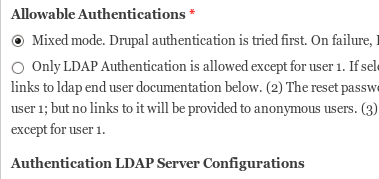
Authentication:
confiugre mixed mode authentication, as well as put a checkbox on the LDAP server you wish to allow authentication from
That’s it!
Hosted Linux Servers at www.zwiegnet.com/go
Related guides: WordPress TLS LDAP Configuration | Configure Joomla 3 for TLS LDAP Authentication