
Copy LDAP to Another Server
Copy LDAP to Another Server
In this scenario, we are going to copy our primary ldap database to our secondary LDAP server and re-apply/update with a more current version. Here’s the basic process:
login on your primary LDAP server, and su to root

from here change to the /tmp directory where we manipulate the LDAP database

from here do a dump of the ldap database
perfect, now from here we are going to login to our 2nd ldap server

cd /tmp

now we sftp to our primary LDAP server

you should be greeted with the following:

change to the /tmp directory

this next command downloads the LDAP database from the original LDAP server

done, here’s what the download should have looked like

now exit from sftp
stop the LDAP service

from here remove the present info/database

start the LDAP service with an empty database

from here add the file to re-create the database

type in your LDAP admin password

you should see something like this:

obviously you will get the error that it cannot update your admin password, because that would break LDAP.
let’s re-dump the database to make sure all is well

now vi the ldapdb

cool, we can see our most recent entry John Smith is in there.
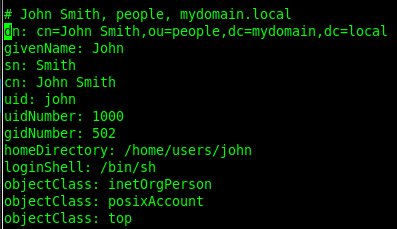
done! we made a copy of LDAP, and moved it to another server.
Hosted Linux Servers at www.zwiegnet.com/go
Related guides: LDAP Replication CentOS 6 | Configure LDAP Server on CentOS 6