
Mutt has many capabilities that can be added to the .muttrc. One of the best enhancements is to add a signature line to your .muttrc so every new message includes a short sign-off without retyping it. Mutt appends the file you name, and by convention a line with only -- separates the body from the signature.
Prerequisites
- Mutt installed (
yum install mutt/dnf install mutt). - A user account with a home directory (this edits
~/.muttrcand~/.signature).
1. Point .muttrc at a signature file
Add the following to ~/.muttrc (create the file if it does not exist):
# Signature File
set signature="~/.signature"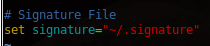
You can use any path; ~/.signature is the usual choice. If you prefer a command that generates the signature dynamically, Mutt also accepts set signature="~/bin/mk-sig.sh|" with a trailing pipe.
2. Create ~/.signature
vi ~/.signature{specify your signature in the file} — for example:
--
Thanks!

Andrew Zwieg
IT Administrator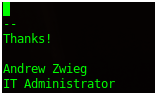
Keep the first line as -- (dash dash) if you want clients and mailing-list software to treat everything below it as a signature.
3. Restart Mutt and compose a message
Restart the mutt client, and go to create a new email message (m in the index, or start mutt with an address).
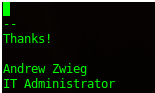
You should notice the — separating the email body from the signature. That’s it!
Verify
mutt -D | grep signatureThat prints the active signature setting. Opening a new message should already show your sign-off below the cursor.
Troubleshooting
- No signature appears: the path in
set signatureis wrong, or you edited a different muttrc (system/etc/Muttrcvs~/.muttrc). Runmutt -D | grep signatureinside the account you launch mutt as. - Signature shows but without —: add a first line containing only two dashes to
~/.signature. - Want HTML or a richer sign-off: Mutt’s native signature is plain text. For multipart alternatives you need a send-hook or an external macro; stay with plain text for mailing lists.
Modern Fedora, RHEL, AlmaLinux and Rocky Linux
The same ~/.muttrc directives work on current releases. Package install is dnf install mutt (or neomutt if you prefer NeoMutt; NeoMutt reads the same set signature option). Config can also live in ~/.config/mutt/muttrc if you use the XDG layout — point signature the same way.
Related guides: Send Email Script CentOS | Using IRC and IRSSI for Linux Support