
This is the server-side walkthrough for adding TLS to an OpenLDAP (slapd) server on CentOS 6. You’ll create a self-signed certificate, load it into the cn=config database, and turn on LDAPS on port 636 next to StartTLS on port 389. Each step has a screenshot from our test server.
Looking for the client side? Our companion post OpenLDAP over TLS: Client Setup, Testing and Troubleshooting covers ldap.conf, trusting the certificate on clients, testing with ldapsearch -ZZ and openssl s_client, and fixing common TLS errors. This page covers only the server.

Before you start
You need a working OpenLDAP server on CentOS 6 (see Configure LDAP Server on CentOS 6) and a root shell. Decide the hostname clients will use, such as ldap.example.com. The certificate’s Common Name must match it.

Part 1: Generate the certificate
CentOS 6 ships a Makefile in /etc/pki/tls/certs that wraps the OpenSSL commands:
cd /etc/pki/tls/certs
make LDAP.key

make runs openssl genrsa -aes128 2048 and asks for a passphrase:
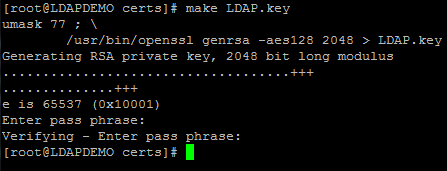
slapd can’t type a passphrase when it starts, so strip it from the key:
openssl rsa -in LDAP.key -out LDAP.key
Create a certificate signing request. When asked for the Common Name, enter the server’s FQDN:
make LDAP.csr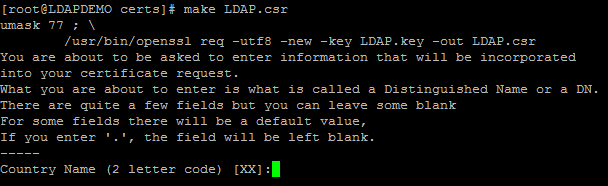
Self-sign it. Our lab used 36500 days. In production, use a shorter lifetime or a certificate from your internal CA.
openssl x509 -in LDAP.csr -out LDAP.crt -req -signkey LDAP.key -days 36500
Lock down the files:
chmod 400 LDAP.*
Part 2: Load the certificate into slapd
Copy the key and certificate to the OpenLDAP certificate directory and give them to the ldap user:
mkdir -p /etc/openldap/cacerts/
cp /etc/pki/tls/certs/LDAP.* /etc/openldap/cacerts/
chown ldap. /etc/openldap/cacerts/*
Change cn=config over the local ldapi socket as root:
ldapmodify -Y EXTERNAL -H ldapi:///
Paste this LDIF, then press Ctrl+D:
dn: cn=config
add: olcTLSCertificateFile
olcTLSCertificateFile: /etc/openldap/cacerts/LDAP.crt
-
add: olcTLSCertificateKeyFile
olcTLSCertificateKeyFile: /etc/openldap/cacerts/LDAP.key
If the attributes already exist, for example because you’re renewing the certificate, use replace: instead of add:.
Part 3: Enable LDAPS and restart
Edit the slapd startup options:
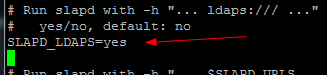
vi /etc/sysconfig/ldap
Set SLAPD_LDAPS=yes (around line 20) so slapd also listens on ldaps:///, port 636:
Restart slapd:
service slapd restart
Part 4: Server-side checks
netstat -tlnp | grep slapd
iptables -I INPUT -p tcp -m multiport --dports 389,636 -j ACCEPT
service iptables save
You should see slapd listening on both 389 and 636. If slapd won’t start, check /var/log/messages. The usual cause is that the ldap user can’t read the key.
Next, set up your clients to trust this certificate with the client setup and troubleshooting guide.
Hosted Linux server at www.zwiegnet.com/go
Related guides: OpenLDAP over TLS: Client Setup, StartTLS Testing and Troubleshooting | 389 Directory Server TLS Client CentOS