
Check /etc/passwd and /etc/group with pwck and grpck
Check /etc/passwd and /etc/group with pwck and grpck
the pwck and grpck are great tools for checking to verify your local accounts/groups are in order, and there are no duplicates. Sadly, most UNIX admins don’t learn to use this tool until after they have already made a mistake. Misktakes happen by manually modifying the /etc/passwd and /etc/group files, rather than the built in utilities of “groupadd” and “useradd”
Let’s get started, login, and su to root

PWCK:
the first thing we want to use is pwck, this checks the /etc/passwd as well as the /etc/shadow file for issues, issue the following command:
you should see the following:
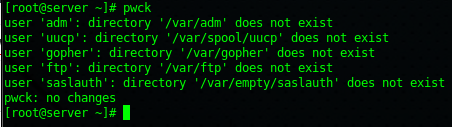
this is a bit confusing because it lists things that usually do not exist as errors. According to the man page, the -q option shows us errors only, rather than misc directory issues, for most cases this is a good way to test, but it’s helpful to know what the standard output looks like

So IF users on your local system are configured properly, and you run pwck, you should recieve the following:

a blank line. IF you have a user, or users configured properly, usually due to bad administration, you would see something similar:

as you can see, the user “test50” has been accidently entered twice, most likely by editing the /etc/passwd file, and not running pwck once completed. You can choose to delete the line here, or manually delete the improper enter from the file once the issue has been reconciled.
grpck:
The second tool grpck is a nice additional tool to check local group integrity, it works along the same lines.
if you run grpck and there are no issues, then you will be returned to the # prompt

if there is an issue, you will see something like the following:
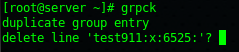
should you choose to hit yes to resolve the prolem now, it will fix the problem.
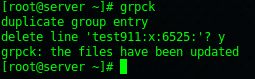
That’s it!
Hosted Linux Servers at www.zwiegnet.com/go
Related guides: Understanding Linux File Permissions | 16 usermod Command Examples for Linux User Administration