
Change Default Printer CUPS CentOS 6
Change Default Printer CUPS CentOS 6
Each Linux system has a default, even if you have a full CUPS Server, the local system default can be set. Here’s how to do that:
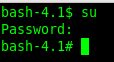
login, and su to root
to view you present default, issue the following command, the d= default destination

perfect, now let’s look at what printers are available
as you can see there are two printers available, we want to switch it to the B1260dn, to do so, issue the following command:

usually the long string of commands shows when the printer was changed
now if we do another lpstat -d
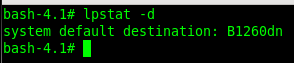
our default printer is changed!
That’s it!
Hosted Linux Servers at www.zwiegnet.com/go
Related guides: Enable/Disable CUPS Printer | Restore CUPS configuration to New Server CentOS 6