
Add Logging to Apache VirtualHost CentOS 6
Add Logging to Apache VirtualHost CentOS 6
By default, Apache writes all logs for as many virtual hosts as you can add to /var/log/httpd/ in either the error log, or the access log, depending on what you are looking for. While this is nice for single sites, it can become quite tedious to weed out traffic from other sites while trying to get accurate logs.
There is two options that can be added to your apache configuration that allow you the ability to seperate the logs for each virtualhost. There are two schools of thought: 1 – Put the logs in non-system directories such as /logfiles so that developers can read the logs, and 2 – put them in the /var/log/httpd/appname directory. While both methods are easily configurable, we are going to go with method 2 for this blog. Let’s get started, login and su to root

change to your apache conf directory

ALWAYS make a backup of your apache configuration
now edit the apache configuration
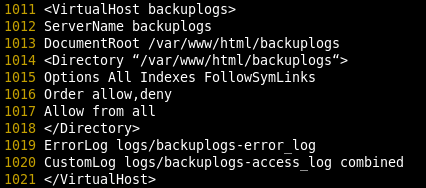
as you can see, we have a very simple apache configuration, we are going to add custom logging to the configuration by adding the following 2 lines:
** Note, this is where you can change between method 1, and method 2 mentioned above
CustomLog /var/log/httpd/NameOfURL.domain.local-access_log common
ErrorLog /var/log/httpd/NameOfURL.domain.local-error_log
so as you can see, we are adding theese two lines for the access_log and error_log to go to a different location. Please be sure to put this after the URL, instead of in the “Directory” area, like so:
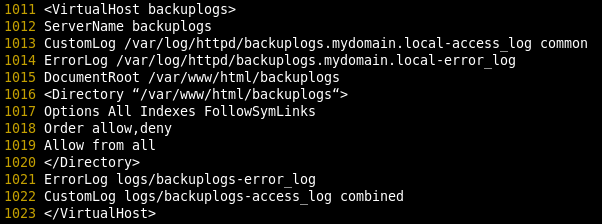
as you can see, we added and customized lines 1013 and 1014

once completed, go to the path of your logs, and verify that there is indeed a log, and it is indeed being written to when said site, is being accessed.

now you are writing logs for this particular virtualhost to the specified logfiles.
that’s it!
Hosted Linux servers at www.zwiegnet.com/go
Related guides: Install Apache on CentOS 6.4 | Disable Apache Version