
send different username ssh-keygen CentOS
send different username ssh-keygen CentOS
say you setup ssh-keygen on an account on your external computer to a network server, it works great as long as you type in “username@servername” this can get quite tedious, especially if this is what you have to do all day.
Here’s what you do:
login, and change to your .ssh directory
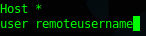
from here create a file called “config”
setup the config file as follows:
now when you SSH, it will automatically send the username you just specified.
That’s it!
Hosted Linux Servers at www.zwiegnet.com/go
Related guides: Configure SSH Key Authentication Only | Allow SSH Connections Fedora 19