
Cheap USB-to-HDMI dongles built on the MacroSilicon MS9133 chip work on Windows and macOS once you install the vendor driver, but on a current Linux kernel they usually just sit there. ms91xx-linux-drm fixes that. It is a free, open-source Linux DRM/KMS driver for the MS9133 that I built from source and brought up on AlmaLinux 10.2. This post covers what the driver is, what has been tested, and how to build it, load it and get a picture on your extra monitor.
What the MS9133 is and why Linux needs a driver
The MS9133 is a MacroSilicon USB display controller. Instead of being a real graphics card, it receives frame data over USB and turns it into a video signal for an HDMI monitor, TV or projector. It shows up on the USB bus as vendor:product ID 345f:9133 with the name MS USB Video.
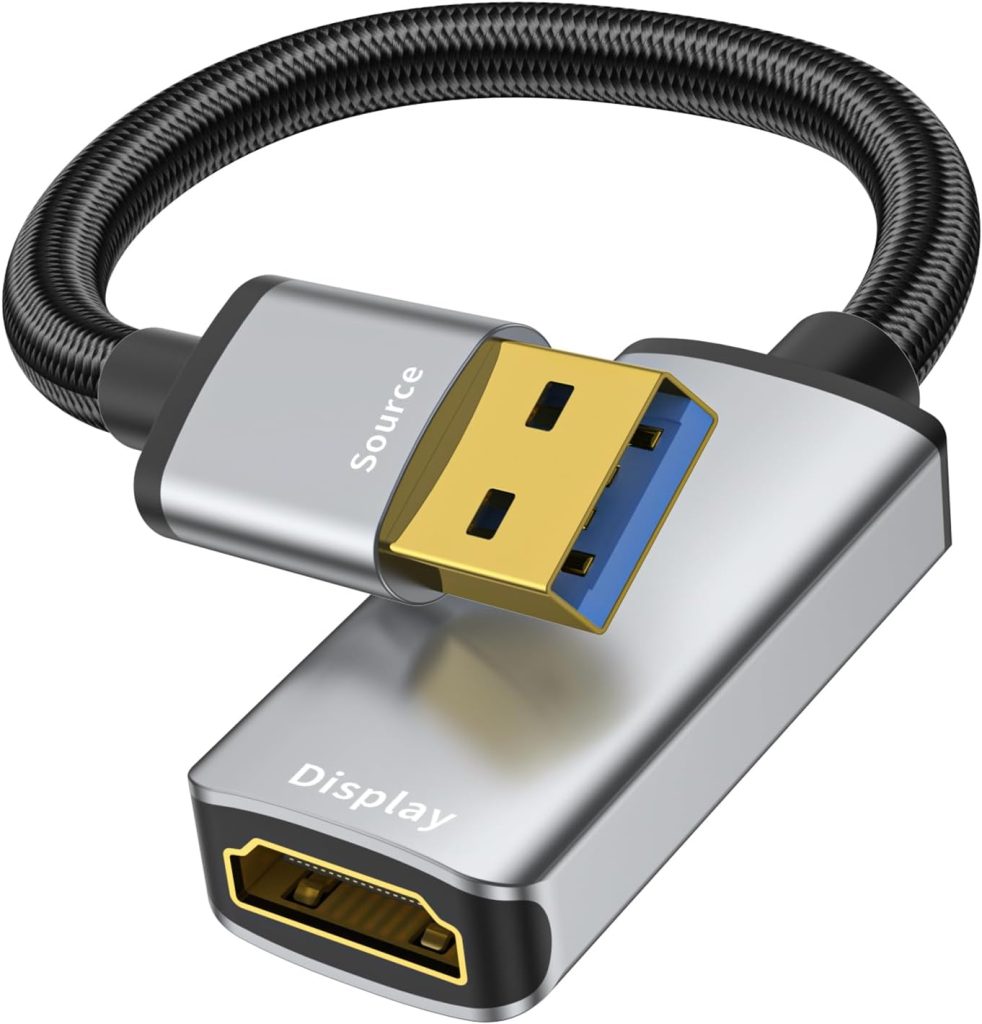
The adapter I use is the THANDBLE USB 3.0 to HDMI adapter (1080p at 60 Hz). Its Amazon listing says plainly that “Driver Installation is Required” and only talks about Windows, macOS and Android. Nothing in the mainline Linux kernel drives this chip. MacroSilicon has released Linux driver source (the repo includes the original MS91xx_Linux_Drm_SourceCode_V3.0.3.13.zip and FrameBuffer_SourceCode_V3.0.2.11.zip archives for reference), but that code crashed on the modern 6.12 kernel I was running. This project starts from MacroSilicon’s DRM driver and adds the compatibility and lifecycle fixes needed for current kernels.
Features and what is included
- A real DRM/KMS driver, so the adapter shows up as its own
/sys/class/drm/cardNdevice with a connector and a framebuffer. - Two kernel modules:
usbdisp_drm.ko(DRM/platform driver) andusbdisp_usb.ko(USB interface and display transport). - USB ID matching for MacroSilicon
345f:9132,345f:9133and345f:9135devices, plus534d:6021(MS912C USB-to-VGA dongles, documented separately indocs/MS912C-VGA.md). - A plain
makebuild against your running kernel, or any installed kernel viaKVER=. - A DKMS config and install/remove scripts, so the modules can be rebuilt automatically when the kernel updates.
- An RPM spec for AlmaLinux 10 that builds a kernel-specific binary RPM and SRPM, including a
modules-load.dfile that loads the modules at boot. - Module options such as
custom_mode=(supply your own mode list when there is no EDID) andport_type=(override the detected video port). - Free software under the GNU GPL v3.
What has been tested
To be clear about where this stands, here is the verified test system from the README:
| Item | Tested configuration |
|---|---|
| Host | HP MP9 G4 Retail System |
| Distribution | AlmaLinux 10.2 |
| Kernel | 6.12.0-211.69.1.el10_2.x86_64 |
| Architecture | x86_64 |
| USB adapter | MacroSilicon MS9133, USB ID 345f:9133 |
| Desktop | KDE Plasma on Wayland |
| Verified display mode | 1920×1080 at 60 Hz |
On that system the adapter initialized, registered its DRM framebuffer and started video output. A separate community-tested setup in the repo docs runs an MS912C VGA dongle as the text console on Debian 13 (kernel 6.12.101). Other kernels, distributions and desktops have not been verified yet, so treat this as experimental kernel software.
Key fixes over the vendor code
- Stopped overwriting kernel-owned device IOMMU state with a pointer to a stack-local structure, which could crash when the platform device was removed.
- Fixed fbdev setup on kernels where
drm_fb_helper.infois not preallocated. The old code could pass a NULLfb_infotodrm_fb_helper_fill_info()and crash during USB probe. - Added validation and locking around USB HAL registration and DRM pipeline operations.
- Improved USB HAL sysfs setup error handling and cleanup, and guarded sysfs callbacks and driver-data access during probe and teardown.
Build the MS9133 driver from source on AlmaLinux 10 / RHEL
Install the compiler, make and the kernel development packages that match your running kernel:
sudo dnf install -y gcc make kernel-devel kernel-headers elfutils-libelf-devel gitMake sure the build files for the running kernel actually exist. If kernel-devel doesn’t match uname -r, update and reboot into the new kernel first.
KVER="$(uname -r)"
test -e "/lib/modules/$KVER/build/Makefile" || {
    echo "Missing kernel development files for $KVER"
    exit 1
}
Clone and build:
git clone https://github.com/azwieg103/ms91xx-linux-drm.git
cd ms91xx-linux-drm
make clean
make -j"$(nproc)" KVER="$(uname -r)"
The build leaves two modules in the drm/ directory. Check them with modinfo:
modinfo drm/usbdisp_drm.ko
modinfo drm/usbdisp_usb.ko
To build for another installed kernel, set KVER to that kernel’s exact version and install its matching kernel-devel package.
Debian and Ubuntu
The main README is written for AlmaLinux and dnf, but the build is a standard out-of-tree kernel module build, and the MS912C notes in the repo were tested on Debian 13. On Debian-family systems, install the toolchain and the headers for your running kernel, then run the same make commands:
sudo apt install build-essential git linux-headers-$(uname -r)This path hasn’t been verified against the MS9133 the way AlmaLinux 10.2 has, so please report how it goes.
Load the modules for a manual test
Save your work first. Loading an out-of-tree kernel driver can crash or hang a system, so keep a way to recover (SSH from another machine, for example). Don’t force-unload modules that are in use. The repo docs specifically warn against rmmod usbdisp_drm, because the vendor teardown path can oops the kernel.
Plug in the adapter and confirm the kernel sees it:
lsusb -d 345f:9133Load the DRM module first, then the USB module:
sudo insmod ./drm/usbdisp_drm.ko
sleep 2
ls -l /sys/class/drm/
sudo insmod ./drm/usbdisp_usb.ko
Then check that both modules loaded and the display pipeline came up:
lsmod | grep usbdisp
ls -l /sys/class/drm/
journalctl -k -b | grep -E 'msdisp|usbdisp|start video|pipe enable'
The adapter appears as a new cardN under /sys/class/drm/. The card and connector numbers depend on what other graphics hardware is in the machine.
Install permanently: RPM package or DKMS
Kernel-specific RPM (AlmaLinux 10)
The repo ships an RPM spec that packages both modules for one specific kernel. It isn’t a kABI/weak-updates package, so rebuild it for each kernel you boot. If you’re new to rpmbuild, see Build RPM From Source.
sudo dnf install -y rpm-build rpmdevtools gcc make elfutils-libelf-devel kernel-devel

VERSION=3.1.6
KVER="$(uname -r)"
TOP="$HOME/rpmbuild"
mkdir -p "$TOP"/{BUILD,BUILDROOT,RPMS,SOURCES,SPECS,SRPMS}
git archive --format=tar.gz --prefix="ms91xx-linux-drm-$VERSION/" HEAD \
  -o "$TOP/SOURCES/ms91xx-linux-drm-$VERSION.tar.gz"
cp packaging/rpm/ms91xx-linux-drm.spec "$TOP/SPECS/"

rpmbuild -ba "$TOP/SPECS/ms91xx-linux-drm.spec" --define "kver $KVER"
If you blacklisted the modules during earlier testing, remove that blacklist before you install, then install the RPM:
sudo rm -f /etc/modprobe.d/blacklist-msdisp.conf
sudo dnf install "$HOME"/rpmbuild/RPMS/x86_64/ms91xx-linux-drm-*.rpm
The RPM installs the modules under /lib/modules/KVER/extra/ms91xx/, runs depmod, and adds /usr/lib/modules-load.d/msdisp.conf. That file loads usbdisp_drm and then usbdisp_usb at boot, and the USB driver binds whenever the adapter is plugged in. Verify the install, then reboot as the first real test:
modinfo -n usbdisp_drm
modinfo -n usbdisp_usb
cat /usr/lib/modules-load.d/msdisp.conf
DKMS
For automatic rebuilds on kernel updates, the repo includes dkms.conf (package msdisp, version 3.1.6) and dkms-install.sh/dkms-remove.sh. The install script copies the source to /usr/src/msdisp-3.1.6, builds and installs it with DKMS, rebuilds the initramfs with dracut, update-initramfs or mkinitcpio, and tries a live module reload. Read the scripts before you run them. They change system module directories, and the DKMS workflow hasn’t been validated in the current hardware test.
sudo dnf install -y dkms rsync   # dkms comes from EPEL on AlmaLinux
sudo ./dkms-install.sh
Configure the extra display
KDE Plasma (Wayland)
This is the tested setup. Once the modules are loaded, the adapter’s output shows up as another monitor. Arrange it, set it to 1920×1080 at 60 Hz, and choose extend or mirror in System Settings → Display Configuration.
X11 sessions (xrandr)
MacroSilicon’s original build notes (in build_driver.txt) say that under X11 the USB device depends on the main GPU’s rendering ability. It needs a GPU provider with Source Output capability, and you may have to restart the display manager after loading the modules. List the providers:
xrandr --listprovidersProvider 0 is normally the main GPU, and its cap should include Source Output. If the USB device’s provider shows associated providers: 0, link it to the GPU (here provider 1 is the USB adapter and 0 is the main GPU; adjust the numbers to match your output), then enable the new output:
xrandr --setprovideroutputsource 1 0
xrandr --auto
xrandr
GNOME
GNOME isn’t part of the verified test matrix. If the DRM device and connector come up as shown above, the display should appear under Settings → Displays. If you try it, please report your results on the repo.
Troubleshooting
- Nothing happens when you plug it in. Check the ID with
lsusb. The driver matches345f:9132,345f:9133,345f:9135and534d:6021. - Build fails with missing headers. Your
kernel-develdoesn’t match the running kernel. Compareuname -rwithrpm -q "kernel-devel-$(uname -r)"andls -ld /lib/modules/$(uname -r)/build. - No picture. Read the kernel log:
journalctl -k -b | grep -E -i 'msdisp|usbdisp|345f:9133|drm|dma'. - A page-allocation warning in dmesg. On the test system the kernel logged a warning from
__alloc_pages_noprof()during a high-order DMA allocation. The HAL then fell back tobuf type vmalloc, and video still started. This is a known open item. - VGA (MS912C) dongle shows “no signal”. See
docs/MS912C-VGA.md. Those devices needoptions usbdisp_usb port_type=2 custom_mode=1_640x480@60,4_1280x720@60in/etc/modprobe.d/usbdisp.conf.
lsusb -d 345f:9133
uname -r
rpm -q "kernel-devel-$(uname -r)"
journalctl -k -b | grep -E -i 'msdisp|usbdisp|345f:9133|drm|dma'
Known limitations
These haven’t been fully validated yet: loading automatically at boot, repeated unplug and replug, suspend/resume, long runs under memory pressure, more than one MS9133 at a time, and other distributions, kernels, chips and desktops. If you open an issue, include the adapter’s USB ID, your distribution release, kernel version, build output and the relevant kernel log lines.
Free and open source
The driver is free and released under the GNU GPL v3. You don’t need a vendor CD, a signup or a closed binary. Everything is built from source on your own machine. The code, the original vendor source archives and the packaging files are all on GitHub at github.com/azwieg103/ms91xx-linux-drm.
If you have an MS9133-based dongle like the THANDBLE USB 3.0 to HDMI adapter, give the driver a try. Star the repo if it gets your extra screen working, and open an issue or pull request with your results, especially from distributions and desktops beyond AlmaLinux 10 and KDE.