
Find Hard Disk Space Fedora Linux
Find Hard Disk Space Fedora Linux
need to find out how much data you are using on your Fedora Linux System?
open up a command/terminal window
do df -h
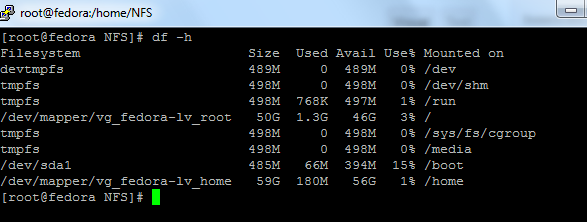
as you can see, there is two “volume groups” Fedora-lv_root” and “fedora-lv_home”
think of logical volumes like Windows paritions
LV_root has your operating system, logs, configs, etc
LV_home is where most of the data is stored at.
That’s it!
If you are interested in a hosted Fedora Linux Server visit www.zwiegnet.com/go to get started
Related guides: Add a Disk to LVM and Expand Space | Find Hard Drive IOPS CentOS