
Configure Filesystem Loop CentOS 6
Configure Filesystem Loop CentOS 6
Filesystem loops are incredibly useful, they convert files/folders into usable block devices. For the purpose of this example, we are going to configure so two folders are “looped” together. This is incredibly handy, and does a better job than a sym-link in the example of adding another disk, or if you have a crappy installer that places files in odd places.
login, and su to root

from here we need to create our 2 folders
/mnt/loop1, and /mnt/loop2

from here edit fstab

your entry should look as follows, basically you are looping /mnt/loop1 to /mnt/loop2
Issue a mount -a to re-mount the fileystems in fstab

now, let’s test the loop

ok, so to review, we created the file in /loop1, now let’s go to loop2
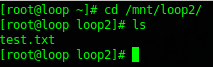
great! out loop works, the beauty of this, is that unlike a sym-link, this works both directions
That’s it!
Hosted Linux Servers at www.zwiegnet.com/go
Related guides: Mount a Drive on CentOS Linux | Add a Disk to LVM and Expand Space