
this i unfortunately had to learn on the fly, not sure how it happened, but let’s just say that it did. i noticed a bunch of my SQL Server Databases had the (Single User Mode) around them, my first thought was “no big” as long as its running, I’m the only one using them. NOT
In single-user mode only one connection to the database is allowed at a time. That one connection could be an application, a SQL Agent job, or the SSMS window you have open, so everyone else gets locked out. This guide shows how to check the mode and switch it back to multi-user in SQL Server Management Studio (SSMS) or with T-SQL.
The three access modes
- MULTI_USER (shown as Multiple in SSMS): normal operation, so any user with permission can connect.
- SINGLE_USER (Single): one connection at a time. It is used for maintenance, for some restore and repair operations, and sometimes left behind by a script that failed partway.
- RESTRICTED_USER (Restricted): only members of db_owner, dbcreator or sysadmin can connect.
Fix it in SSMS
Right-click the database in Object Explorer, choose Properties, and open the Options page.
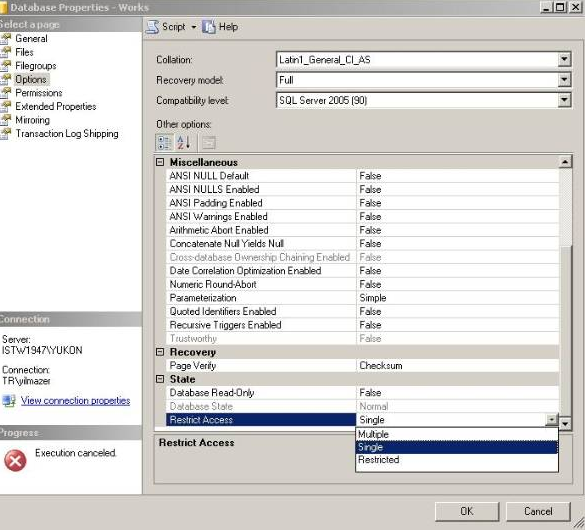
in the actual database, make sure that under options, at the very bottom, it’s set for multiple, or more than likely you will have database issues. The setting is Restrict Access in the State section. Choose MULTI_USER and click OK.
Fix it with T-SQL
Run this in a query window connected to master, replacing Works with your database name:
USE master;
ALTER DATABASE [Works] SET MULTI_USER;
To put a database into single-user mode on purpose for maintenance, and disconnect everyone else immediately:
ALTER DATABASE [Works] SET SINGLE_USER WITH ROLLBACK IMMEDIATE;WITH ROLLBACK IMMEDIATE rolls back other sessions’ open transactions and disconnects them instead of waiting.
Verify
SELECT name, user_access_desc FROM sys.databases;Every database you expect to be in normal use should show MULTI_USER.
Troubleshooting: someone else holds the only connection
If the change fails with error 924 (the database is already open and can only have one user at a time), another session holds the single connection. Find it and end it:
SELECT session_id, login_name, host_name, program_name
FROM sys.dm_exec_sessions
WHERE database_id = DB_ID('Works');
KILL 53;   -- replace 53 with the session_id returned above
ALTER DATABASE [Works] SET MULTI_USER;
Close any SSMS Object Explorer or query windows pointed at the database first, because they often hold that connection themselves. The same steps apply to every SQL Server version from 2005 (shown in the screenshot) through 2022.
Related guides: Create New Database SQL Server | Backup SQL Server Express