
Add Swap Disk to Linux
Add Swap Disk to CentOS
** NOT RESPONSIBLE FOR DATA LOSS, BE SMART, MAKE A BACKUP!! **
In a few select scenarios, there may be a time where adding RAM is not an option, however you may have plenty of disk space to work with. This is where swap can be extremely useful.
Login, and su to root

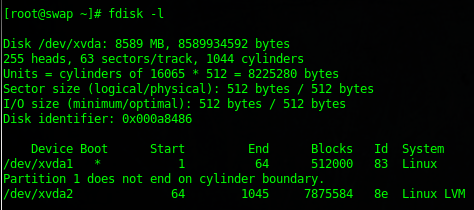
get a general idea how your disks are setup presently by doing a “fdisk -l” to view all block devices

great, at this point all we have is /dev/xvda (may be /dev/sda, or /dev/hda on your system)
also, you may want to verify that swap is actually enabled on your system as well using the swapon summary option

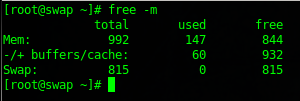
also, you want to verify the problem is actually memory/swap, issue a free -m to see how much memory/swap is used.
from here shutdown the system and add a new disk or block device to use for swap

We have added a 10GB Swap disk in this example. Once the sytem is back online, verify via fdisk -l that the new swap disk appears

great /dev/xvdb has appeared as a 10GB disk, now we just need to format it as swap.
do a fdisk to start partitioning the drive
format as follows:
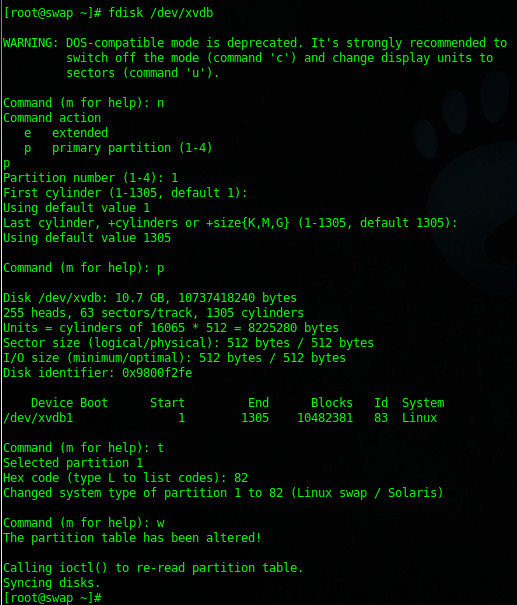
format the disk as swap

enable the disk for swapping

now if we do a swapon -s we will see the two disks available for swapping.

free -m is alot happier

Updating FSTAB:
you would update fstab as follows:

if you wanted to disable the old swap disk, you can do so using the following:

you can change the priority using the syntax of swapon -p 4
That’s it!
Hosted Linux Servers at www.zwiegnet.com/go
Related guides: Add new Hard Drive to CentOS Linux | Add a Disk to LVM and Expand Space