
Configure MySQL Multi-Master Replication
Configure MySQL Multi-Master Replication
In this scenario we are configuring mysql master-master replication. The idea behing multimaster is to load-balance MySQL. This configuration will allow read/write on both database servers, as well as replciation.
first things first, install MySQL on your CentOS MySQL Servers

once installed, the next step is to set mysql to run on startup, and start the service now

perform the safe MySQL installation on each node

modify node 1 /etc/my.cnf file, to allow remote connections to the MySQL Server, as well as binary logging, and a server id

as always, restart the MySQL service after a configuration change

login to mysql on the master1 server

now create a replication user account, and allow it for all IPs (trust me it’s easier to allow to all IPs)

now give replication priviliges to the replication user

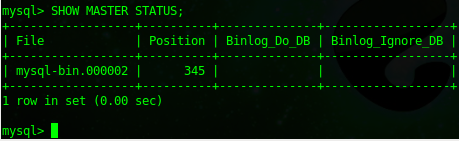
now do a “SHOW MASTER STATUS”
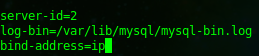
now setup server 2, start by editing the my.cnf
login to MySQL on node2

same as node1, we are going to create a replication user

now create a database on node2
now grant replication permission

From here we go through the steps to allow replication to start occuring, start by stopping the slave on mysql2

now change the master

start the slave again once completed

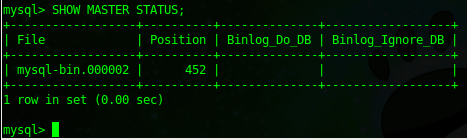
on node 2, we just need to make note of the master status
on master1, stop the slave service

now change the master on slave1

start the slave service

now the last test is to test the replication.
create a new database on node 1
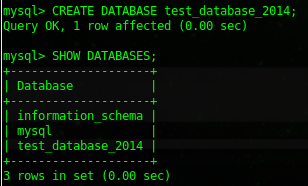
now go to node2, and show all databases
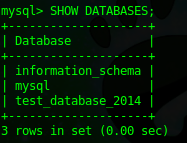
great, it replicated from node1 to node2, now let’s delete/drop the database from node2 and make sure it’s gone from node1

ok, now on node 1, do SHOW DATABASES; it should have disappeared
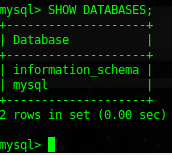
perfect!
Troubleshooting:
SHOW SLAVE STATUSG; will show you if replication is working
Fixing broken replciation:
- stop slave
- re-verify master postition and adjust on slave
- start slave
Some applications are not multi-master aware such as Cacti and Drupal, to work around this, enter the following into /etc/my.cnf on each Master Server, plus any slaves, if you have them.
# Skip Slave Duplicate Data Error
slave-skip-errors=1062
That’s it, you have configured MySQL multi-master replication on CentOS
Hosted Linux Servers at www.zwiegnet.com/go
Related guides: MySQL Replication CentOS All Databases | Convert MySQL Slave to Master