
Change Default Home Directory Linux
Change Default Home Directory Linux
This is a relatively easy task, that allows us to change the default home directory of new users added to the system.
login, and su to root

edit the default user config file

change line 3 to the appropriate path (please make sure the path exists)
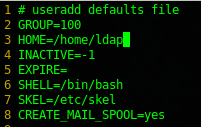
That’s it!
Hosted Linux Servers at www.zwiegnet.com/go
Related guides: Change Default Folder for Linux User | Change home directory of LDAP user command line