
Configure Cacti OpenLDAP authentication
Configure Cacti OpenLDAP authentication
After a few days of work, i was able to get Cacti to Authenticate to a CentOS 6 server running OpenLDAP. Here’s the steps taken:
prerequisite:
yum -y install php-ldap

service httpd restart

Login to cacti as a local administrator
browse to Settings –> Authentication
set the cacti to use LDAP authentication
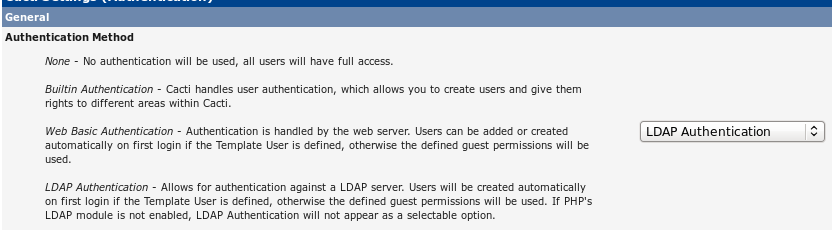
** DO NOT SET ANYTHING FOR THESE FIELDS, IT COULD CAUSE YOU TO NOT BE ABLE TO LOGIN AT ALL! **

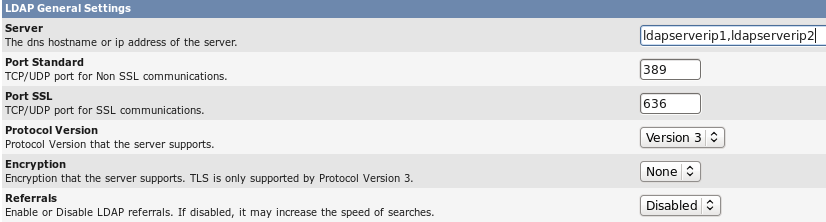
Configure the General settings as follows:
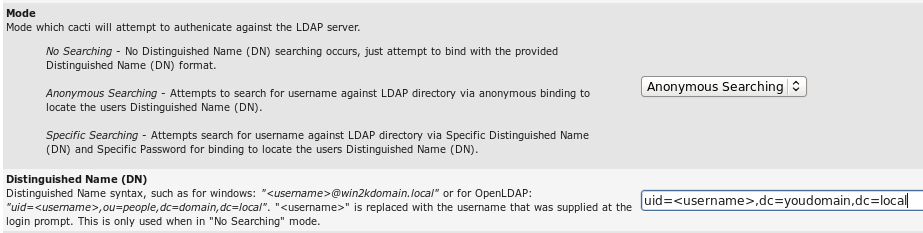
configure the search and DN as follows:
now configure the user specific search settings
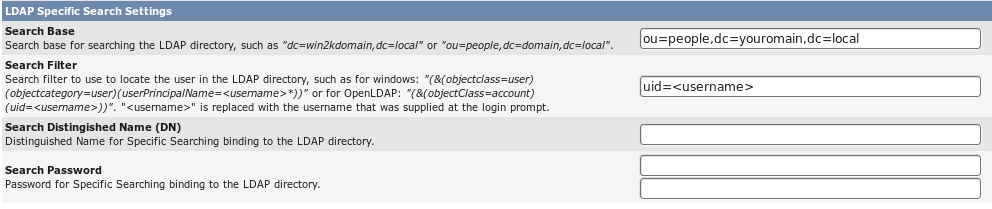
for the search base, put the OU(s) where your users are located in that need to authenticate to cacti with.
It’s important to understand that adding LDAP authentication to Cacti only allows them to authenticate, you still have to create the account, set it to LDAP, and then setup rights.
Save the settings, and go to User Manager” in Cacti, and add a new user to “create” the LDAP account
setup the account, add the full name, make sure the account is set to “enabled” and that the authentication realm is LDAP.
from here set all necessary perimssions that the user may need in the below permission area, as well as creating the proper graph “permissions” once the account has been saved.
That’s it! You have successfully configured Cacti Authentication with OpenLDAP.
Hosted Linux Servers at www.zwiegnet.com/go