
Add User to LDAP command line
Add User to OpenLDAP command line
When LDAP was first introduced, there was no fancy GUI like PhpLDAPadmin, and in some Low-Bandwidth environments, it’s still more favoured to manipulate LDAP via CLI, here’s the basic steps to manipulating OpenLDAP.
login and su to root

change to a temporary directory to where we can manipulate LDAP files
now we need to dump/query the LDAP Database, here’s how to take a dump:
now, let’s create a file with user info to import into the LDAP database

in this case, we are creating a user named john, let’s set his user up

here’s the basics of a user template (make sure the uidNumber is unique, and increases for each user)
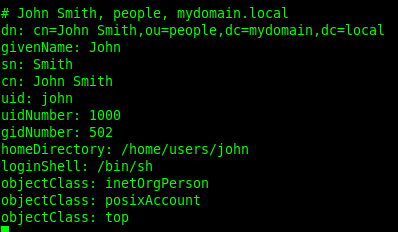
alright, now all we have to do is add this file to the database, and John will have an account for LDAP

here’s the command we use to add the user, you will have to enter your LDAP admin password

done!
Hosted Linux Servers at www.zwiegnet.com/go