
This blog covers the basic steps to disable SELinux on CentOS 7. SELinux (Security-Enhanced Linux) is a mandatory access control layer in the kernel that limits what each service can touch, even when it runs as root. Some older applications and install guides expect it to be off. Before you disable it, consider setting it to permissive while you troubleshoot. That keeps logging what would have been blocked without blocking it.
Prerequisites
- Root access on the server (log in as root or use sudo).
- A maintenance window, because the change only becomes complete after a reboot.
1. Check the current SELinux state
first we need to see how SELinux is configured, issue the sestatus command
sestatus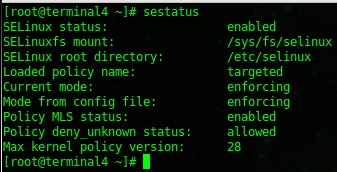
Two lines matter. Current mode is what the running kernel enforces now, and Mode from config file is what will load at the next boot. Both read enforcing here. getenforce prints just the current mode.
2. Change the config file
as you can see the current mode is enforcing, issue the following command to disable it
sed -i 's/enforcing/disabled/g' /etc/selinux/config
sed -i edits the file in place and replaces every occurrence of the word enforcing with disabled, which changes the active line to SELINUX=disabled. (The screenshot names the file twice, which is harmless: sed simply edits it a second time.) You can also open /etc/selinux/config in vi and change the SELINUX= line by hand. Do not touch SELINUXTYPE=targeted. For more on this one-liner, see Using sed to configure SELinux.
now issue the sestatus command again
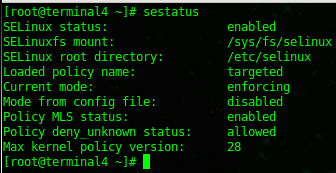
you should see that the config file, is now going to load it as disabled after the next reboot. The current mode stays enforcing until then. To stop enforcement right away without a reboot, run setenforce 0, which switches to permissive until the next boot.
3. Reboot
issue a reboot
shutdown -r now
4. Verify
after a reboot, you can verify that SELinux has been disabled
sestatus
That’s it!
RHEL, AlmaLinux and Rocky Linux 9 and 10
From RHEL 9 onward, SELINUX=disabled in the config file no longer fully disables SELinux. Red Hat documents the kernel boot parameter instead:
grubby --update-kernel ALL --args selinux=0Reboot afterwards. To undo it, run grubby --update-kernel ALL --remove-args selinux.
Turning it back on and troubleshooting
- Re-enabling: files created while SELinux was off have no labels. Set
SELINUX=enforcing(or permissive first), runtouch /.autorelabeland reboot. The relabel can take a while on large filesystems. - Disable only if you must: denials are logged in
/var/log/audit/audit.log.ausearch -m avc -ts recentshows them, and a boolean (setsebool -P) or a file context fix usually solves the problem without turning SELinux off. - Typo in the config: check the file with
grep ^SELINUX= /etc/selinux/config. The valid values are enforcing, permissive and disabled.
Hosted Linux Servers at www.zwiegnet.com/go
Related guides: Disable Iptables CentOS 6.4 | Configure SSH Key Authentication Only
2 Comments